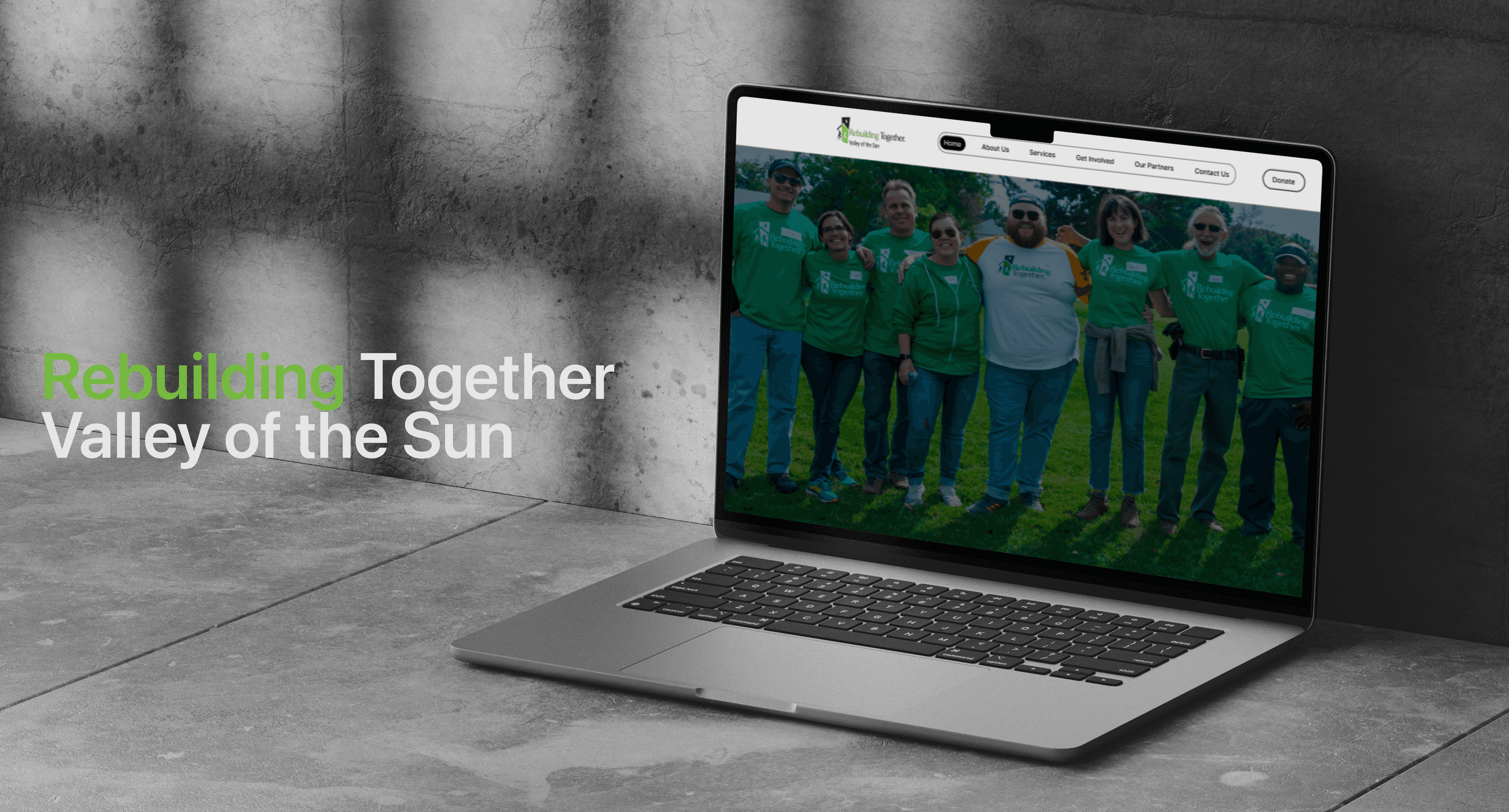
My design process translated usability testing insights into clear, user-centered improvements that simplified key journeys such as donating, volunteering, and hosting a fundraiser. By reducing unnecessary steps, clarifying navigation, and adding consistent feedback and confirmation states, the redesigned experience lowered cognitive load and increased user confidence during task completion. To support these design decisions, I have attached the detailed usability testing and recommendations report Link
Impact
Clearer Paths to Action
Simplified navigation and task-focused layouts help users quickly understand how to donate, volunteer, or host a fundraiser
without hesitation or backtracking.
Reduced Errors & Drop-Offs
Clear required-field indicators, inline guidance, and confirmation states reduce mistakes and prevent abandonment during critical donation and sign-up flows.
Improved Trust & Accessibility
WCAG-aligned typography, improved contrast, and consistent feedback reinforce RTVOS's credibility and increase user confidence in completing actions.
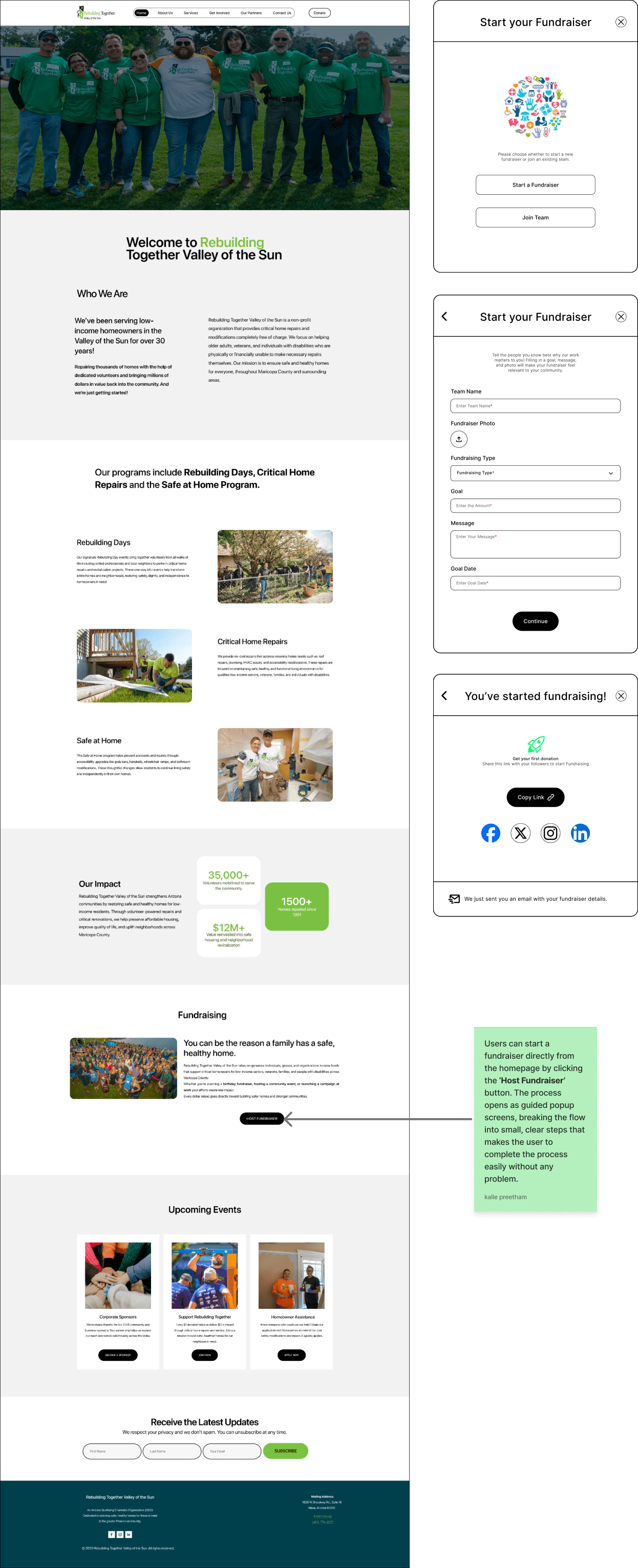
I redesigned the volunteer sign-ups, donation, and fundraising flows to reduce cognitive load and eliminate uncertainty at critical moments. The updated designs simplify complex forms into guided, step-by-step experiences, introduce clear visual hierarchy, and add immediate confirmation and success feedback. These changes significantly improved user confidence, task completion clarity, and overall trust in the platform’s core actions.
High Fidelity Prototypes
Hosting a Fundraiser
Volunteer Sign-Ups
Making a Donation
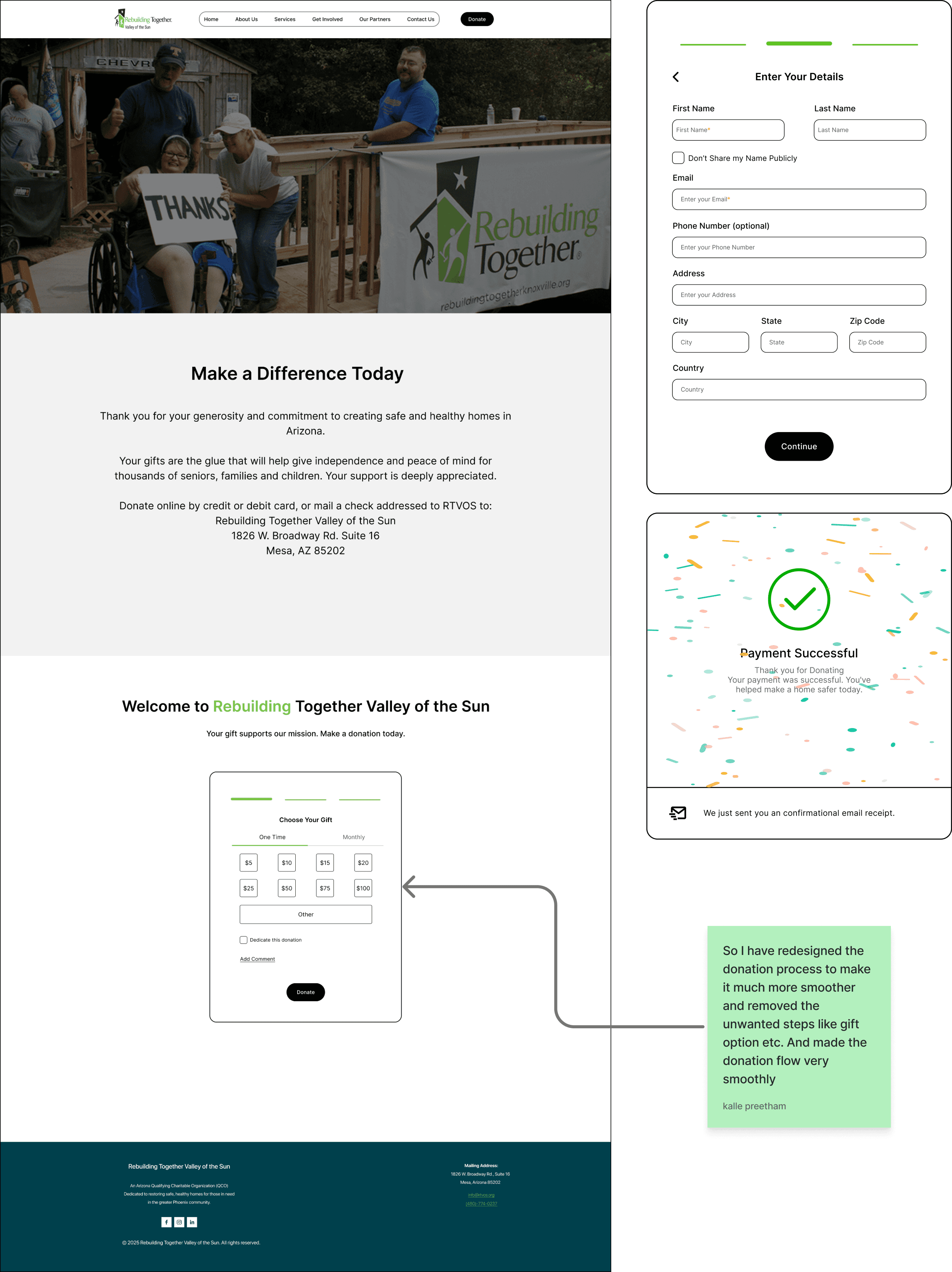
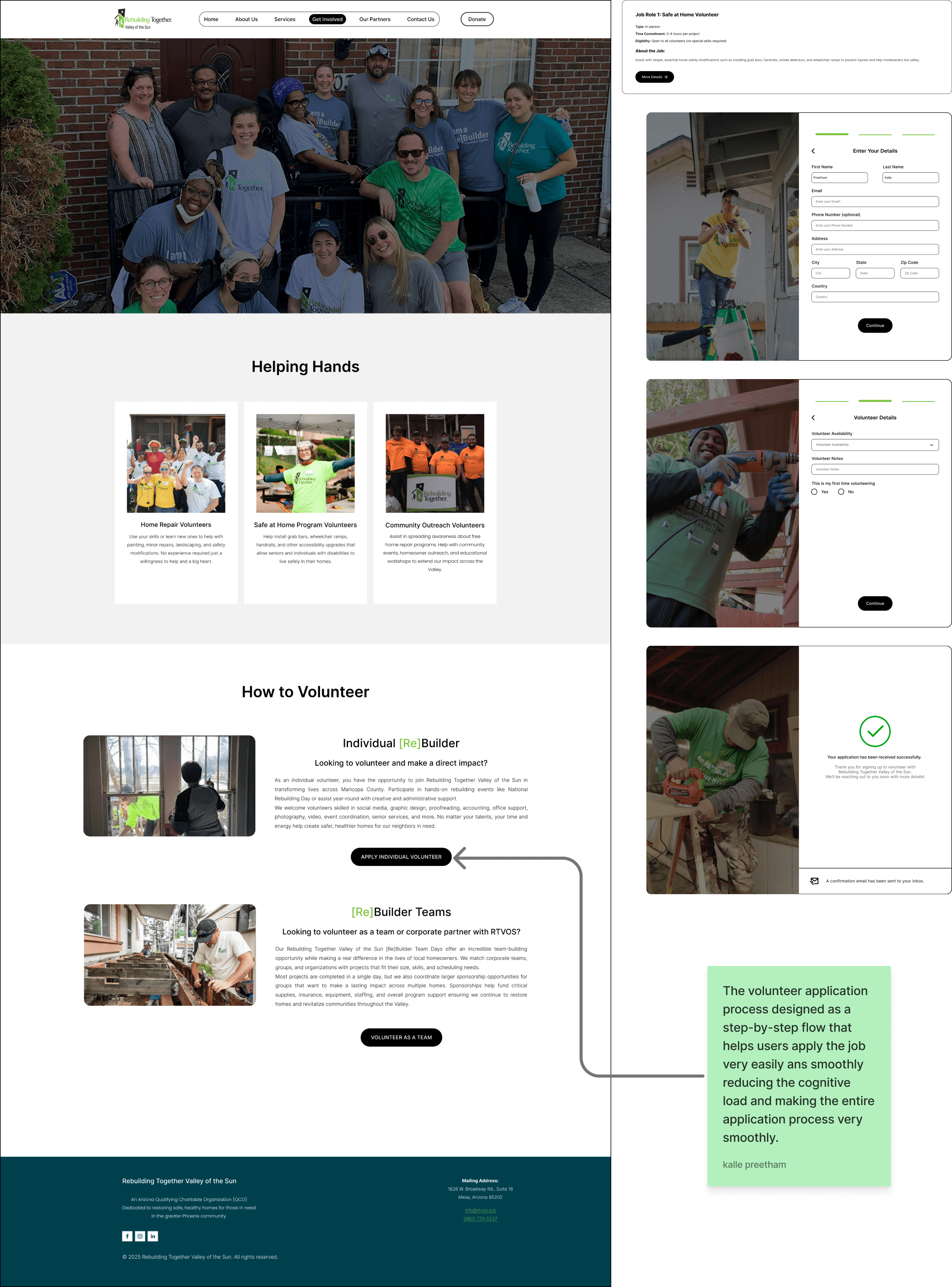
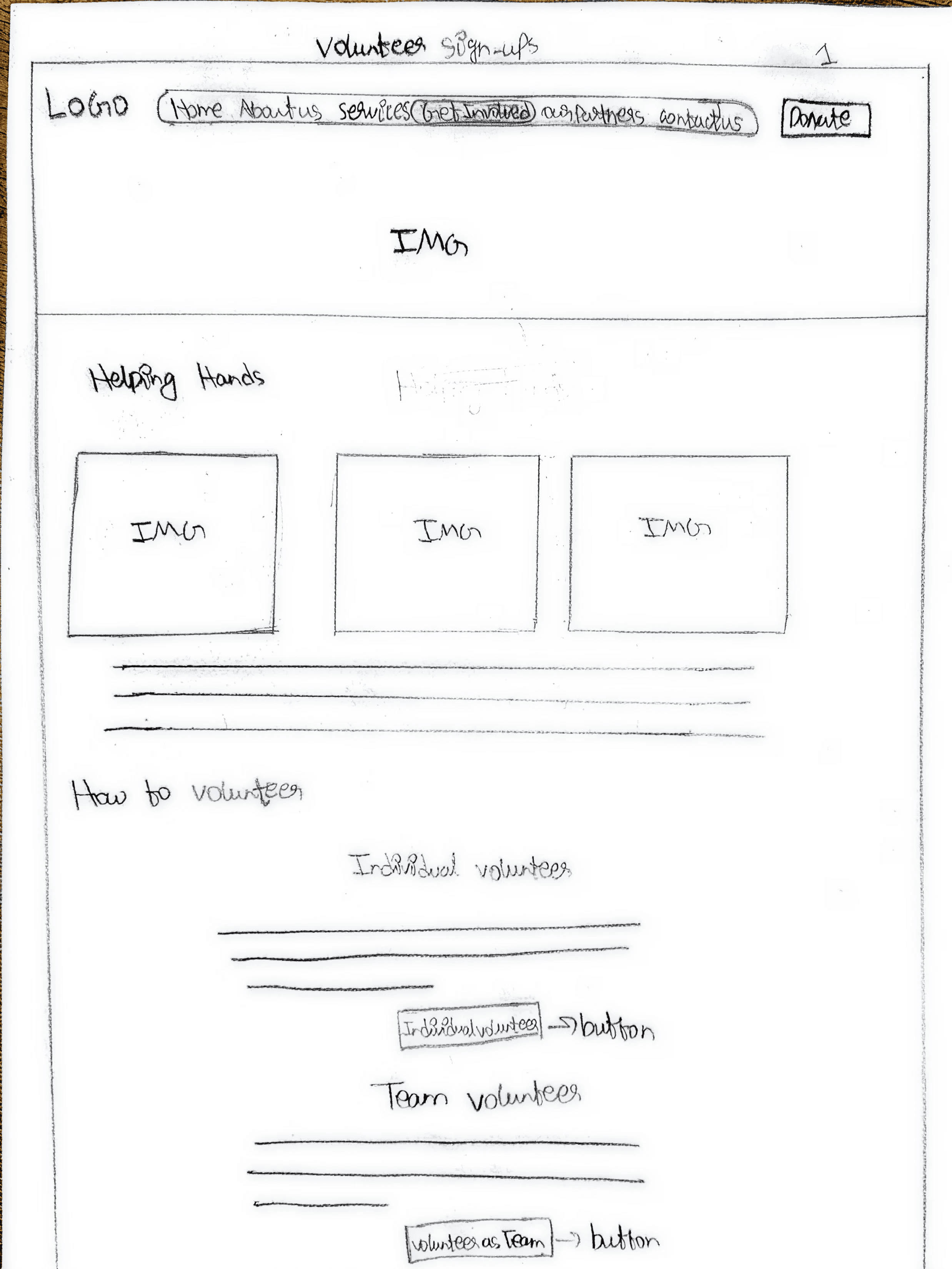
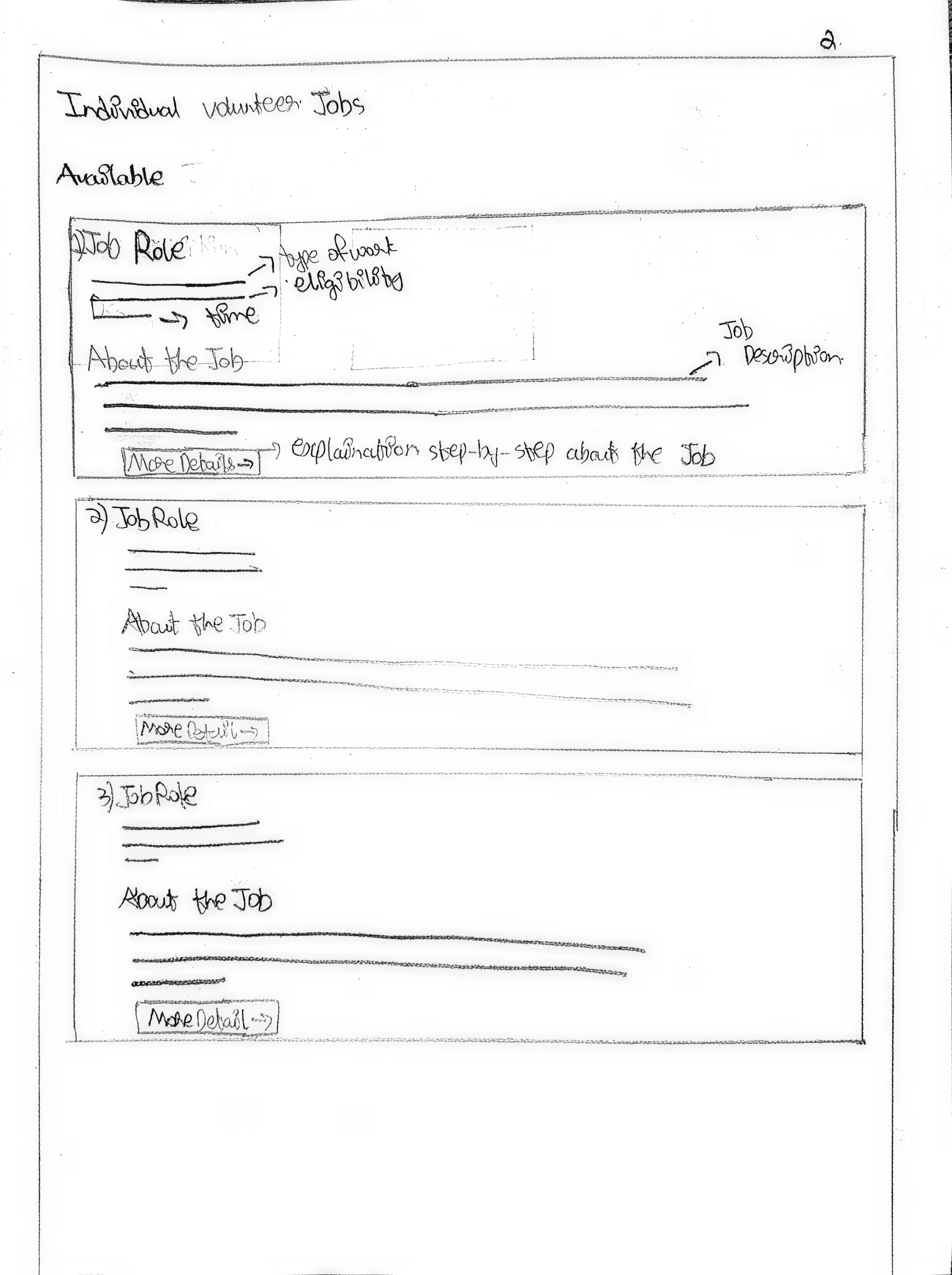
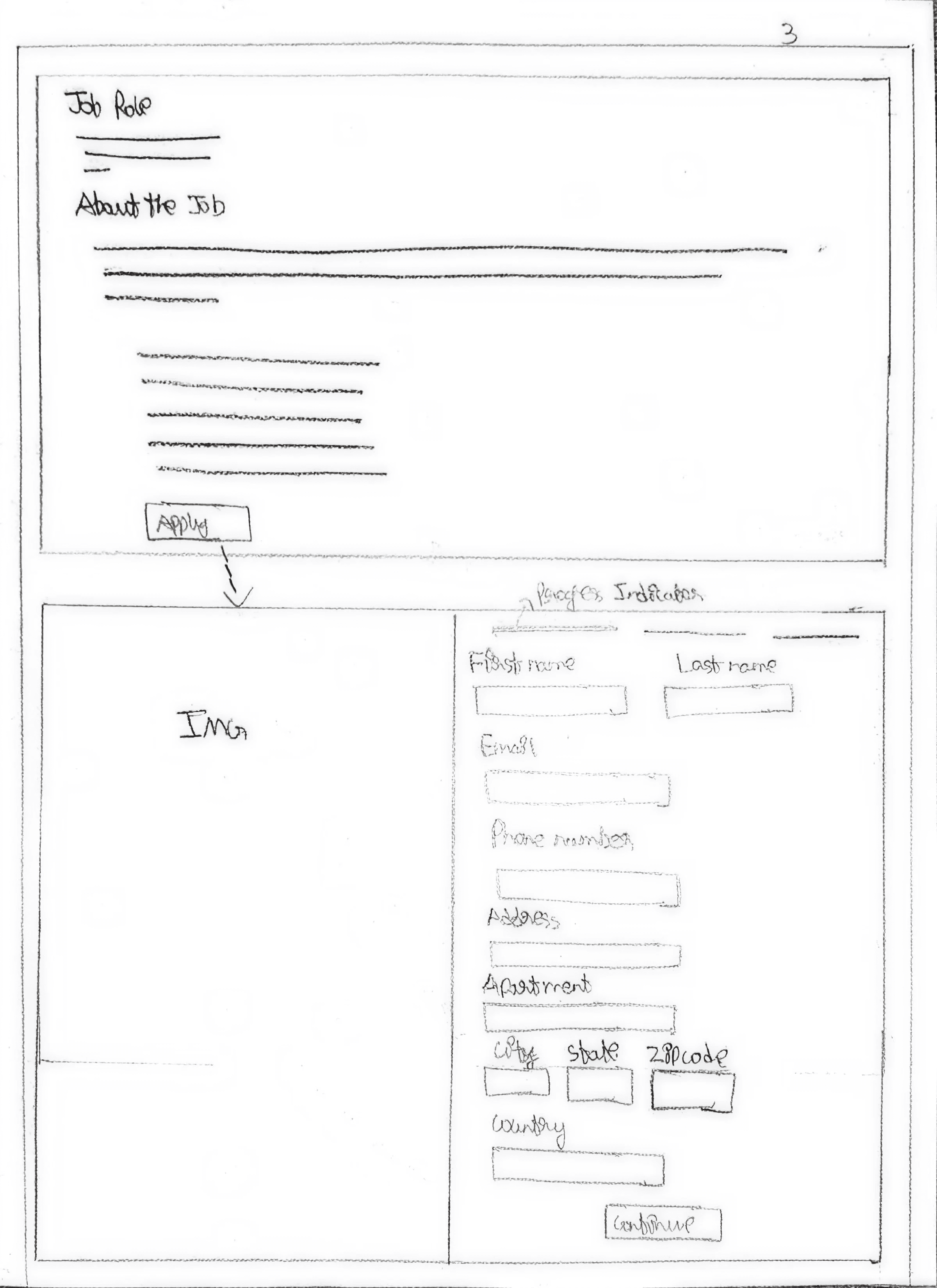
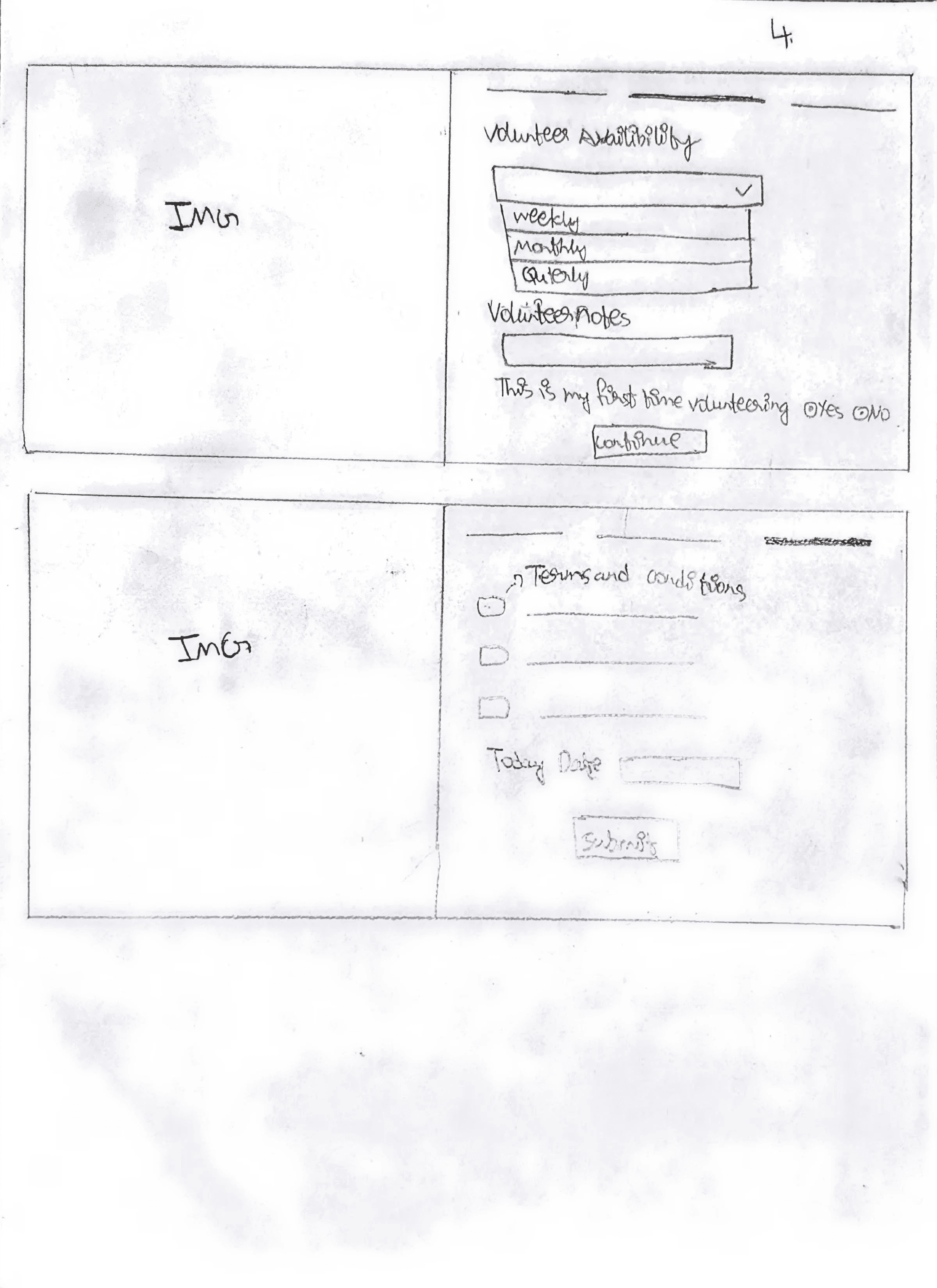
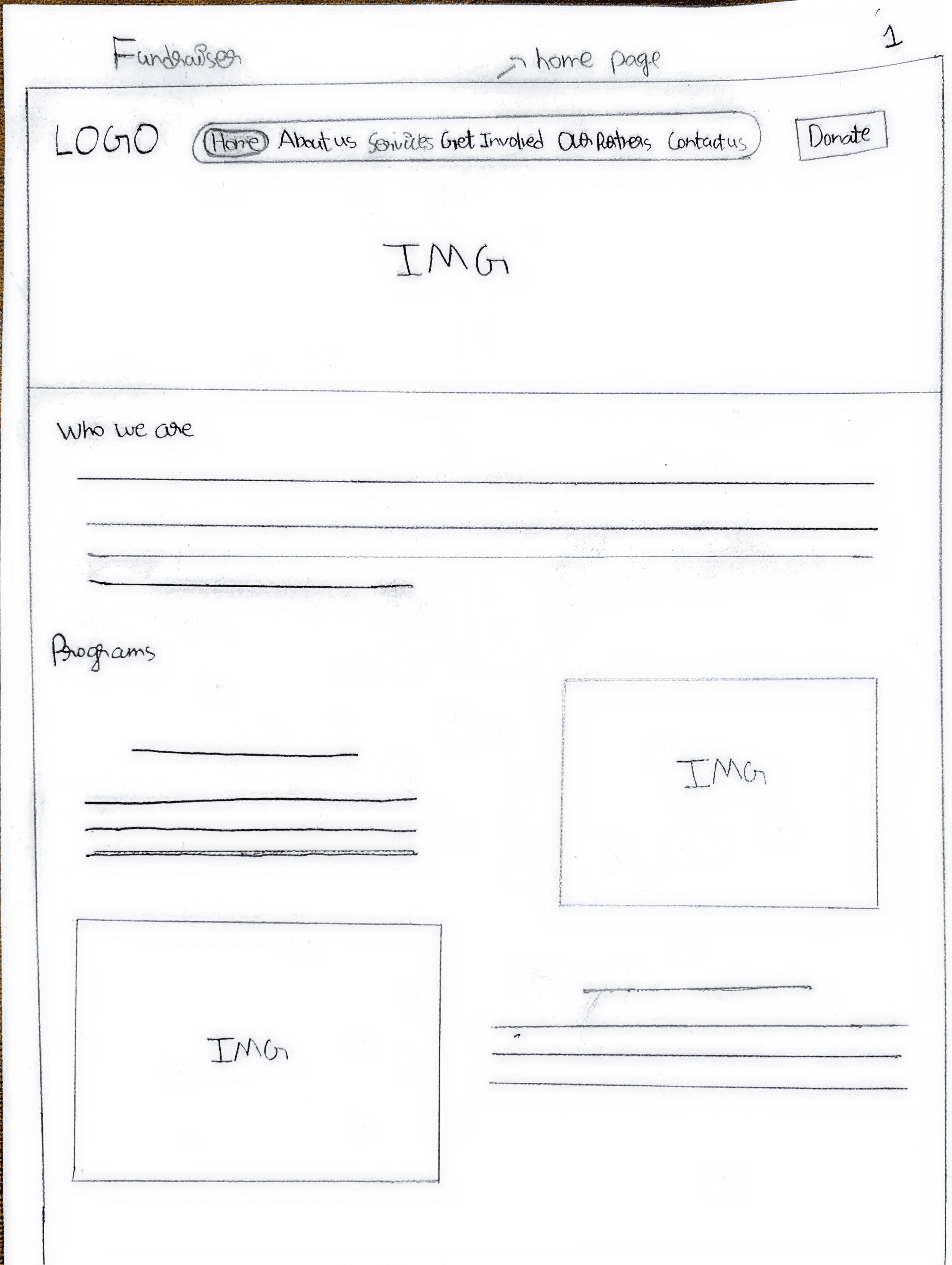
Based on insights from usability testing and heuristic evaluation, I developed these prototype flows to directly address issues around clarity, confidence, and task completion across volunteering, donations, and fundraising. The designs simplify navigation, break complex processes into guided steps, and introduce clear feedback and confirmation states to reduce uncertainty at critical moments. Overall, the solution focuses on making actions feel intuitive, predictable, and reassuring for first-time and returning users.
Low Fidelity Prototypes
Volunteer Sign-Ups
Making a Donation
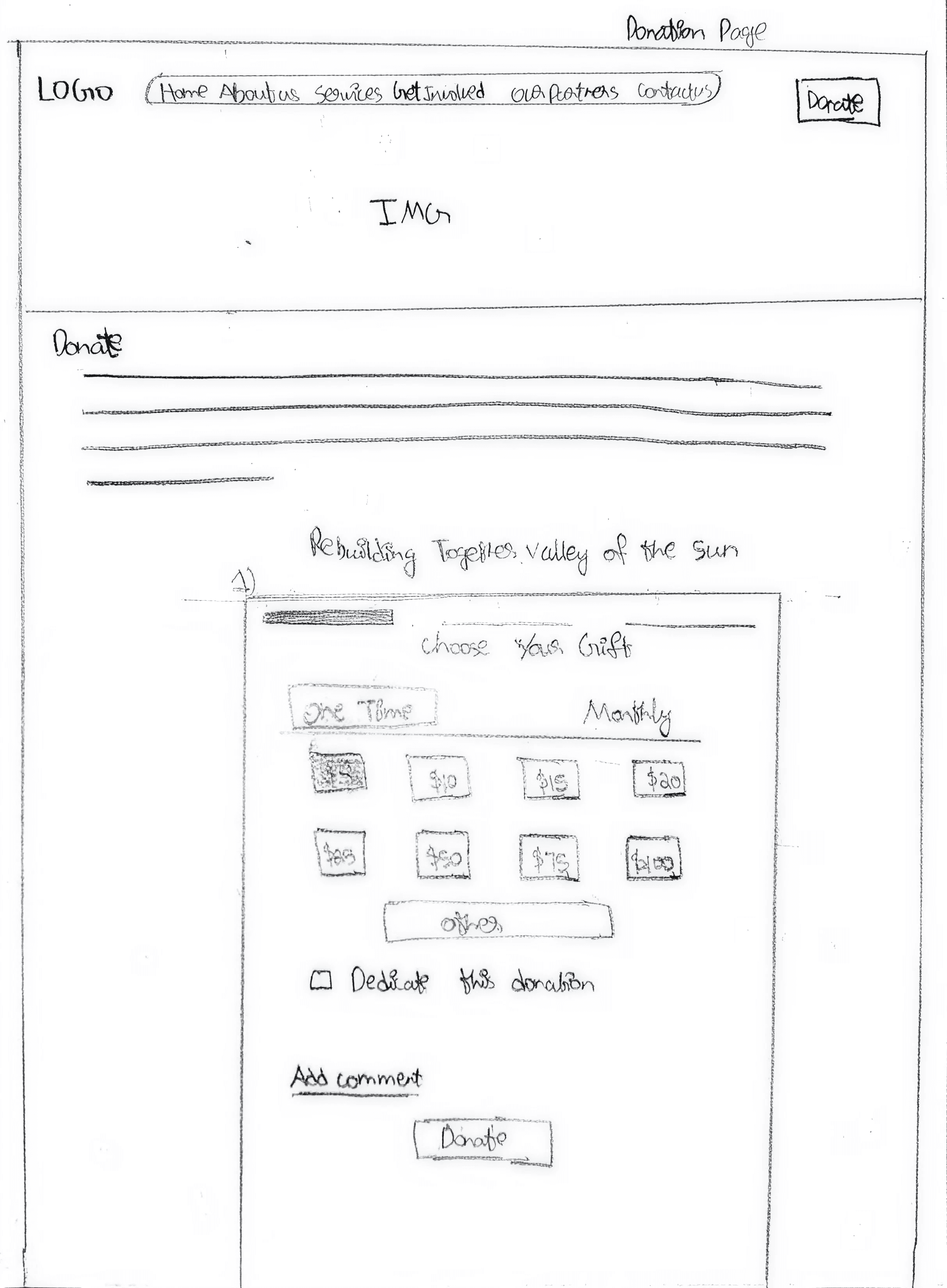
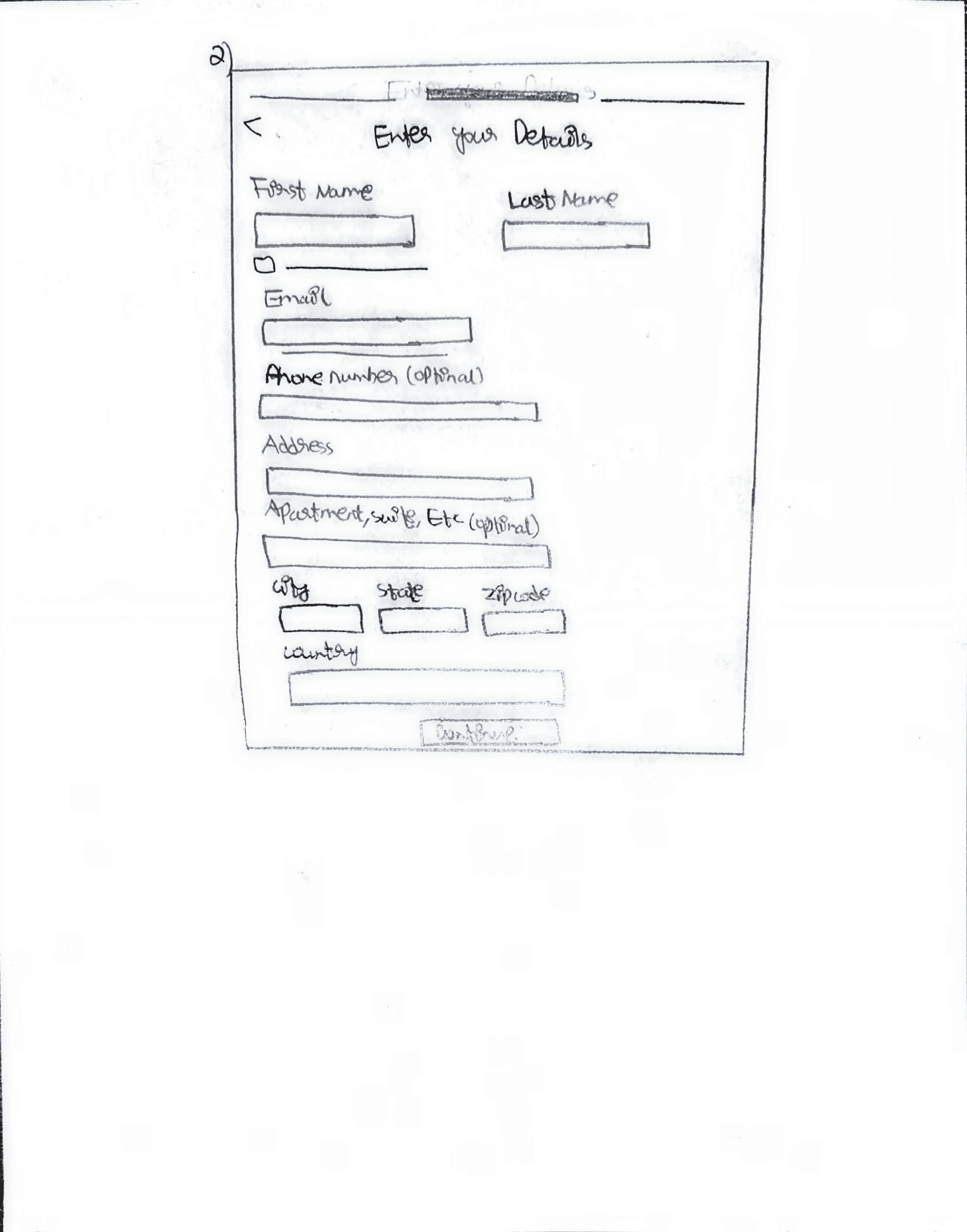
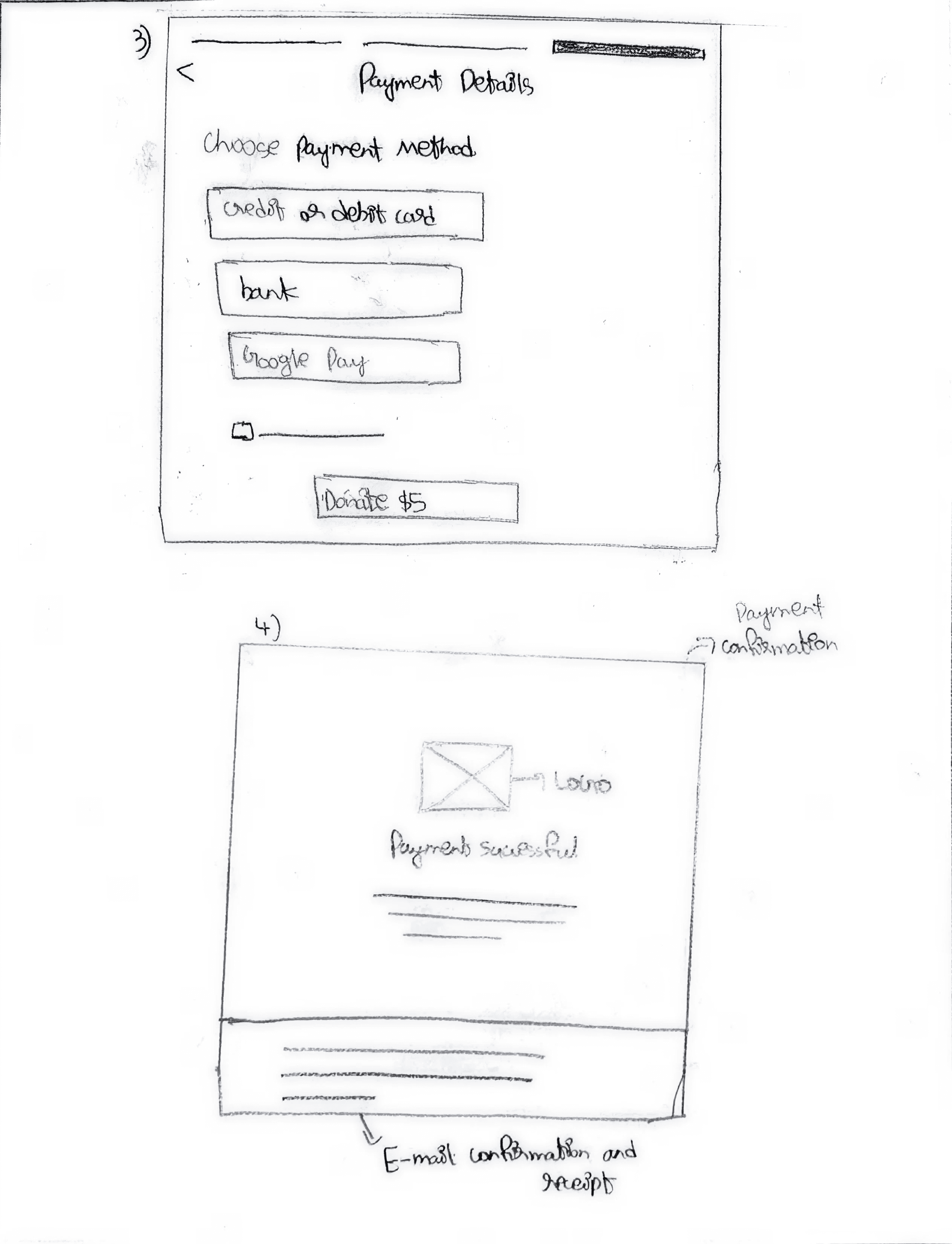
Hosting a Fundraiser
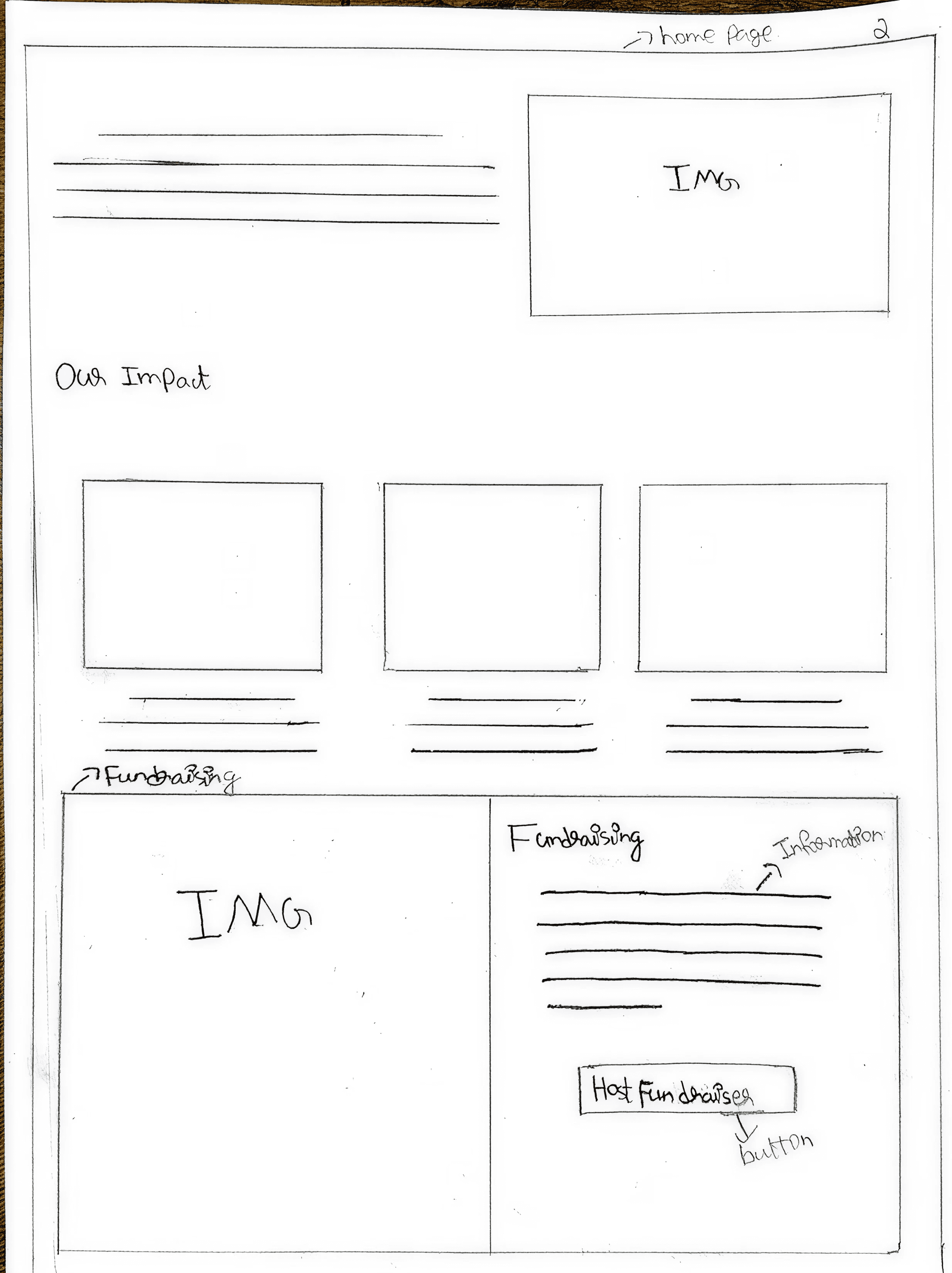
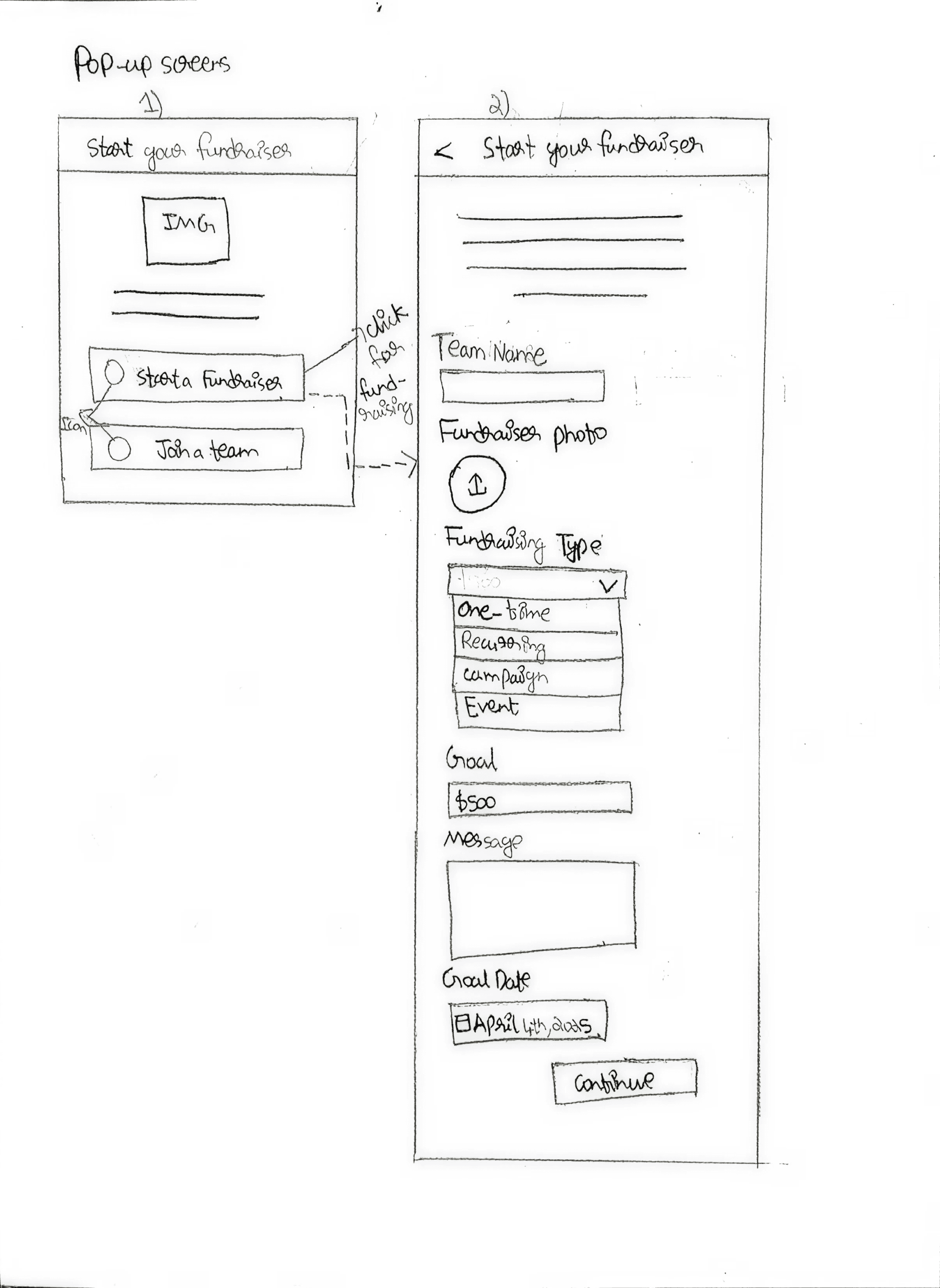
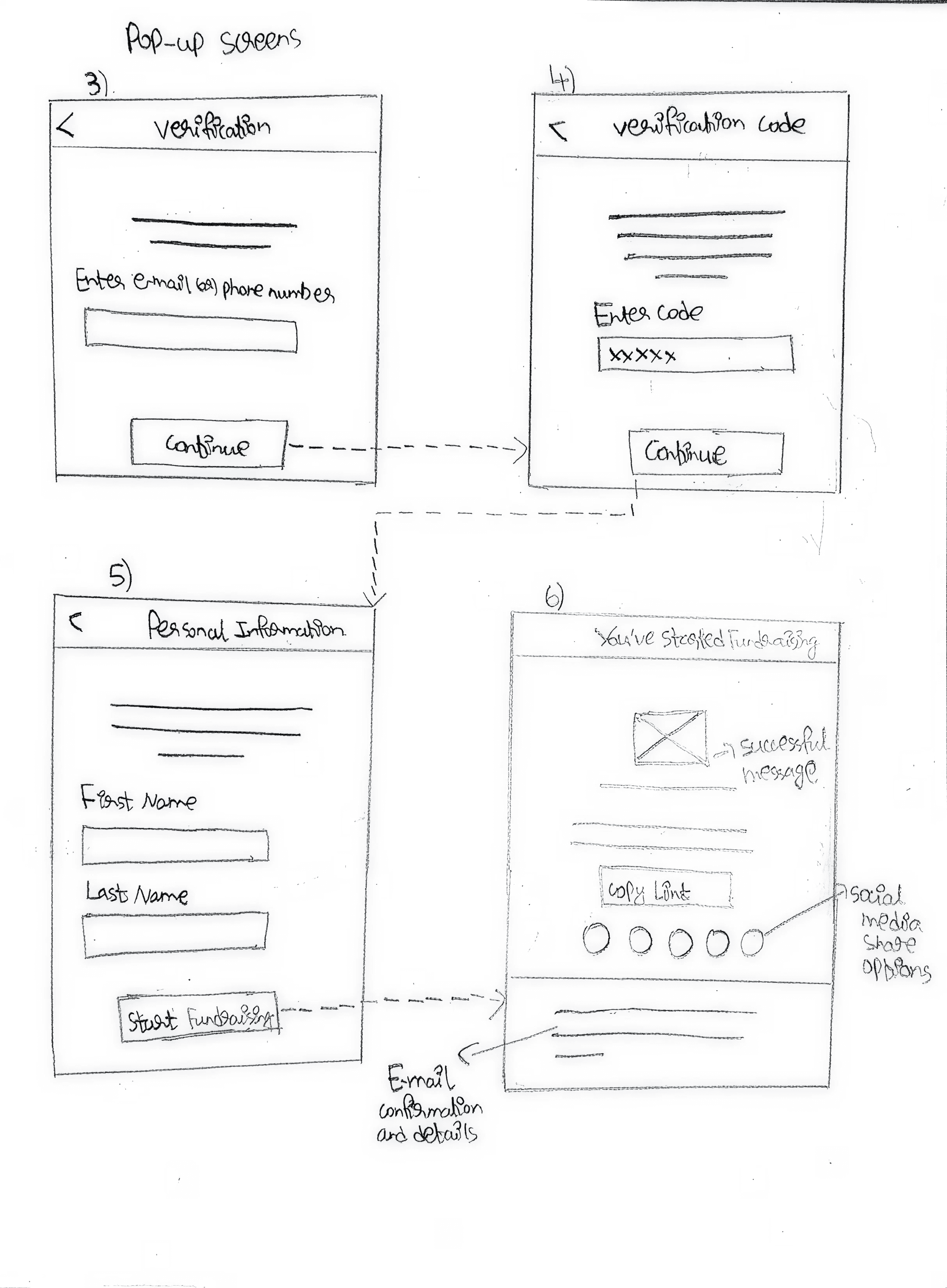
The purpose of this usability testing was to evaluate how effectively users could complete critical tasks on the RTVOS website, including signing up as a volunteer, making donations, and hosting fundraisers. The study aimed to identify usability and accessibility barriers that caused confusion, errors, or drop-off during these high-impact flows. Insights from this testing informed targeted design decisions aimed at improving clarity, accessibility, and overall user confidence.
Usability Testing & Results
SCENARIO 1
Volunteer Sign-Ups
You are interested in volunteering for RTVOS and want to explore available volunteer opportunities.
User Tasks
Locate where you can find information on volunteer opportunities
Sign up for a volunteering job such as Critical Repairs, Safe at Home, or Special Events (of your choice)
Go through the sign-up steps and describe your experience (no need to submit the application)
Evaluation Focus
Is the volunteer section easy to locate?
Are the navigation labels clearly connected to volunteering-related content?
Does the sign-up flow feel clear, guided, and confidence-building?
SCENARIO 2
Making a Donation
You want to support RTVOS and explore available donation options to ensure your contribution is processed correctly.
User Tasks
Locate the donation page and explore different donation options
Select a donation option, choose a $10 amount, and proceed
Fill in required donor details (First name: Alex, Last name: Jones, Email: usertesting@gmail.com)
Select Google Pay as the payment method and complete the donation
Verify whether a success message or receipt confirmation is received
Evaluation Focus
Are donation options clearly explained and distinguishable?
Is the donation form easy to complete without confusion or errors?
Does the system provide clear confirmation after completing the donation?
SCENARIO 3
Fundraiser Setup
You want to host a fundraiser to support RTVOS and encourage others to contribute.
User Tasks
Navigate to the fundraising section and explore available options
Click on “Host a Fundraiser” and initiate the process
Follow the steps to set up a fundraiser, including entering details and verifying email (Use: First name Alex, Last name Jones, Email usertesting@gmail.com)
Check whether the fundraiser setup is successful and a shareable link is generated
Confirm whether an email notification is received
Evaluation Focus
Is the fundraiser option easy to discover?
Are the setup steps clear and logically structured?
Is feedback provided after completing the fundraiser setup?
Usability Testing Tasks
Usability Testing Results
Volunteer Sign-Ups
Key InsightS
Volunteer entry points lacked visibility and clear confirmation
TEST FOCUS
Discoverability of volunteer opportunities
Clarity of navigation and labels
User confidence during sign-up completion
OBSERVED BEHAVIOR
Users could locate volunteer opportunities, but only after multiple navigation attempts.
Participants relied on trial-and-error rather than intuitive cues.
Users were unsure if their sign-up was successfully completed due to missing confirmation feedback.
KEY ISSUES
Volunteer entry points lacked visibility.
Navigation labels did not clearly communicate intent.
Absence of success or confirmation states reduced user confidence.
DESIGN SOLUTIONS
Surface volunteer opportunities with clearer hierarchy and placement.
Refine navigation labels for immediate comprehension.
Add confirmation messages and feedback states after sign-up actions.
Making a Donation
Key InsightS
Inconsistent donation paths and validation gaps caused uncertainty
TEST FOCUS
TEST FOCUS
Ability to find donation options
Understanding of donation choices
Feedback after donation completion
OBSERVED BEHAVIOR
Users hesitated when choosing between multiple donation paths.
Required fields were not immediately clear, leading to form errors.
Users questioned whether donations were processed successfully.
KEY ISSUES
Inconsistent donation entry points created uncertainty.
Missing required-field indicators caused submission errors.
Lack of confirmation messaging reduced trust.
DESIGN SOLUTIONS
Consolidate donation paths into a single, clear flow.
Add required-field indicators and inline validation.
Introduce donation confirmation screens and receipt messaging.
Hosting a Fundraiser
Key InsightS
The fundraiser feature was hidden and the setup felt unstructured
TEST FOCUS
Discoverability of fundraising options
Ease of completing setup steps
Clarity of next actions after setup
OBSERVED BEHAVIOR
Users struggled to locate the fundraiser feature.
Multi-step setup increased cognitive load.
Limited guidance caused uncertainty about completion.
KEY ISSUES
Fundraiser feature lacked visibility.
Setup process felt complex and unstructured.
No clear indication of successful completion.
DESIGN SOLUTIONS
Improve visibility of the “Host a Fundraiser” option.
Simplify setup using progressive disclosure.
Add guidance text and clear completion feedback.
The accessibility audit revealed multiple WCAG compliance gaps, primarily related to missing alternative text, insufficient color contrast, inconsistent heading structure, and small interactive targets. These issues significantly impact screen reader users, low-vision users, and users with motor impairments, reducing overall usability and accessibility compliance.
Accessibility Audit
Issues Identified
Missing Alternative Text
Images lack descriptive alt text, preventing screen reader users from understanding visual content.
WCAG 1.1.1 – Non-Text Content
Insufficient Color Contrast
Navigation and footer text do not meet minimum contrast ratios, affecting readability for low-vision users.
WCAG 1.4.3 – Contrast (Minimum)
Inconsistent Heading Structure
Improper heading hierarchy causes assistive technologies to misinterpret page structure.
WCAG 1.3.1 – Info & Relationships
Small Interactive Targets
Buttons and icons are too small, making interaction difficult for users with motor impairments.
WCAG 2.5.8 – Target Size (Minimum)
Unclear Social Media Link Purpose
Social media icons are not clearly labeled, preventing assistive technologies from identifying their purpose.
WCAG 1.3.1 – Info & Relationships
Text Spacing Issues
Insufficient spacing between text elements reduces readability for users with cognitive and visual impairments.
WCAG 1.4.12 – Text Spacing
Keyboard Navigation Limitations
Some interactive elements lack visible focus states, reducing usability for keyboard-only users.
WCAG 2.4.7 – Focus Visible
Ambiguous Link Labels
Generic or icon-only links lack descriptive context, making it difficult for screen reader users to understand link destinations.
WCAG 2.4.4 – Link Purpose
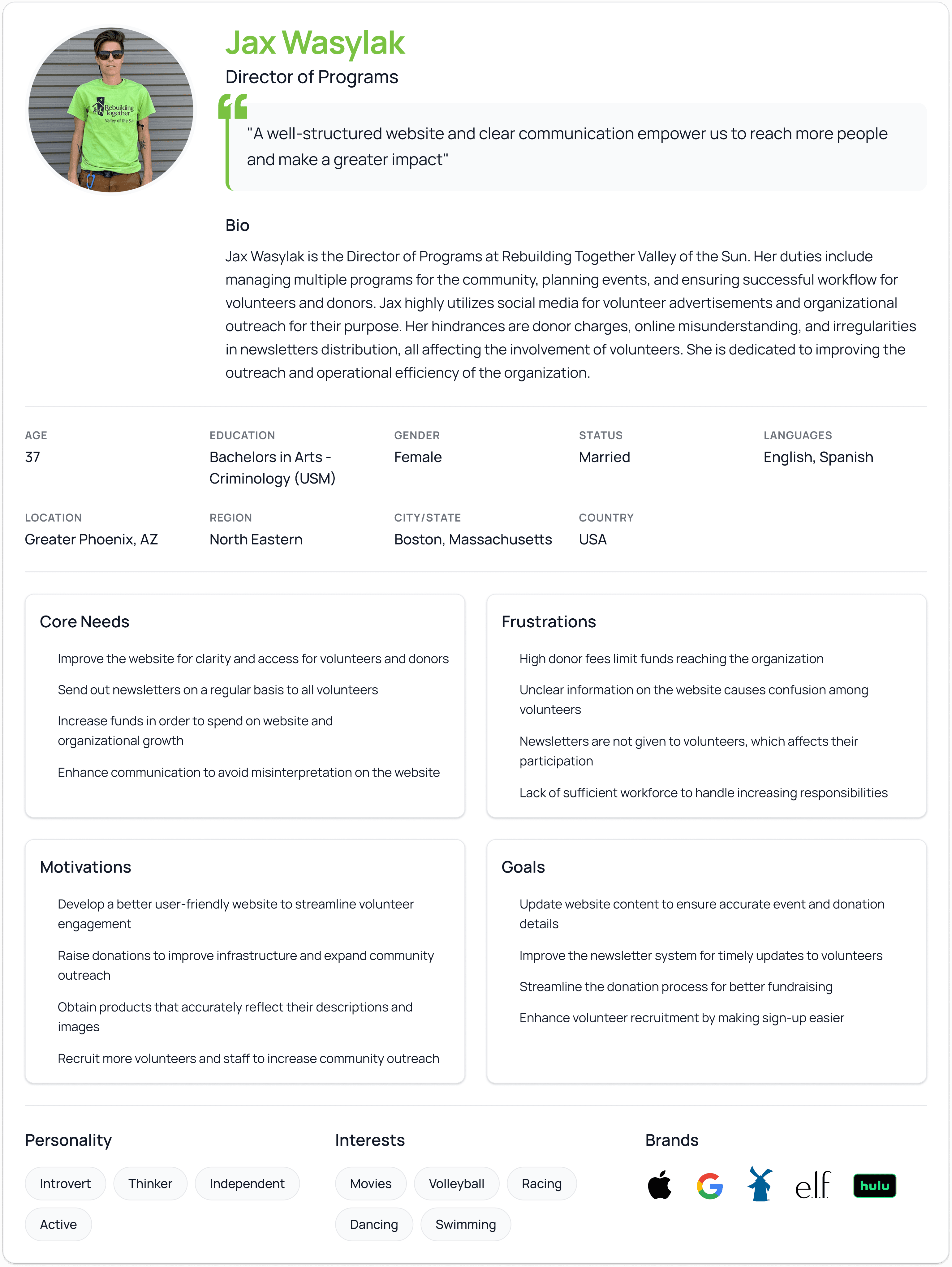
The purpose of this user research was to understand how users perceive, navigate, and interact with the RTVOS website, with a focus on identifying usability barriers in volunteering, donations, and information discovery. The findings helped uncover key pain points, user expectations, and behavioral patterns that informed evidence-based design decisions for improving usability, engagement, and trust.
User Personas
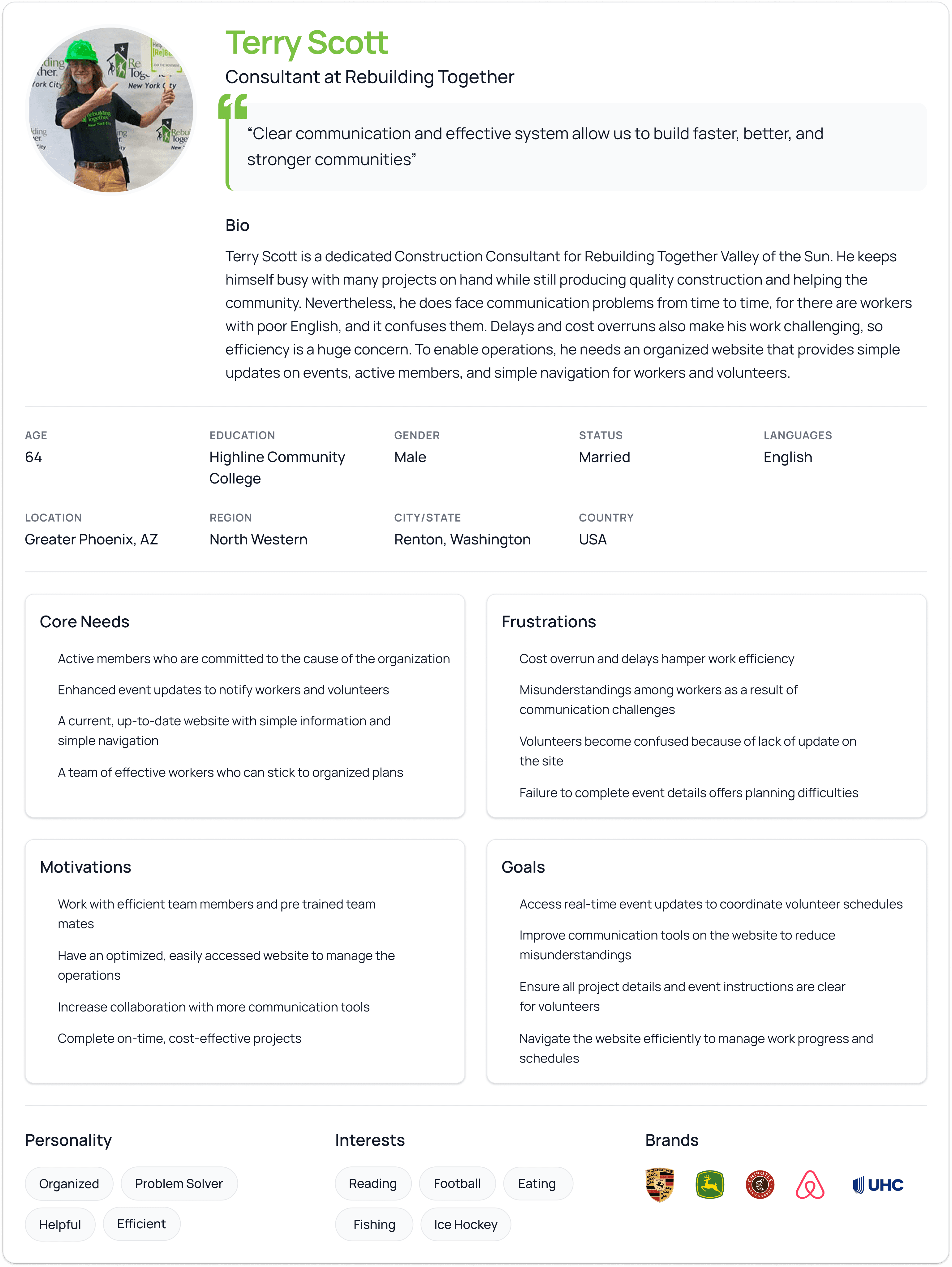
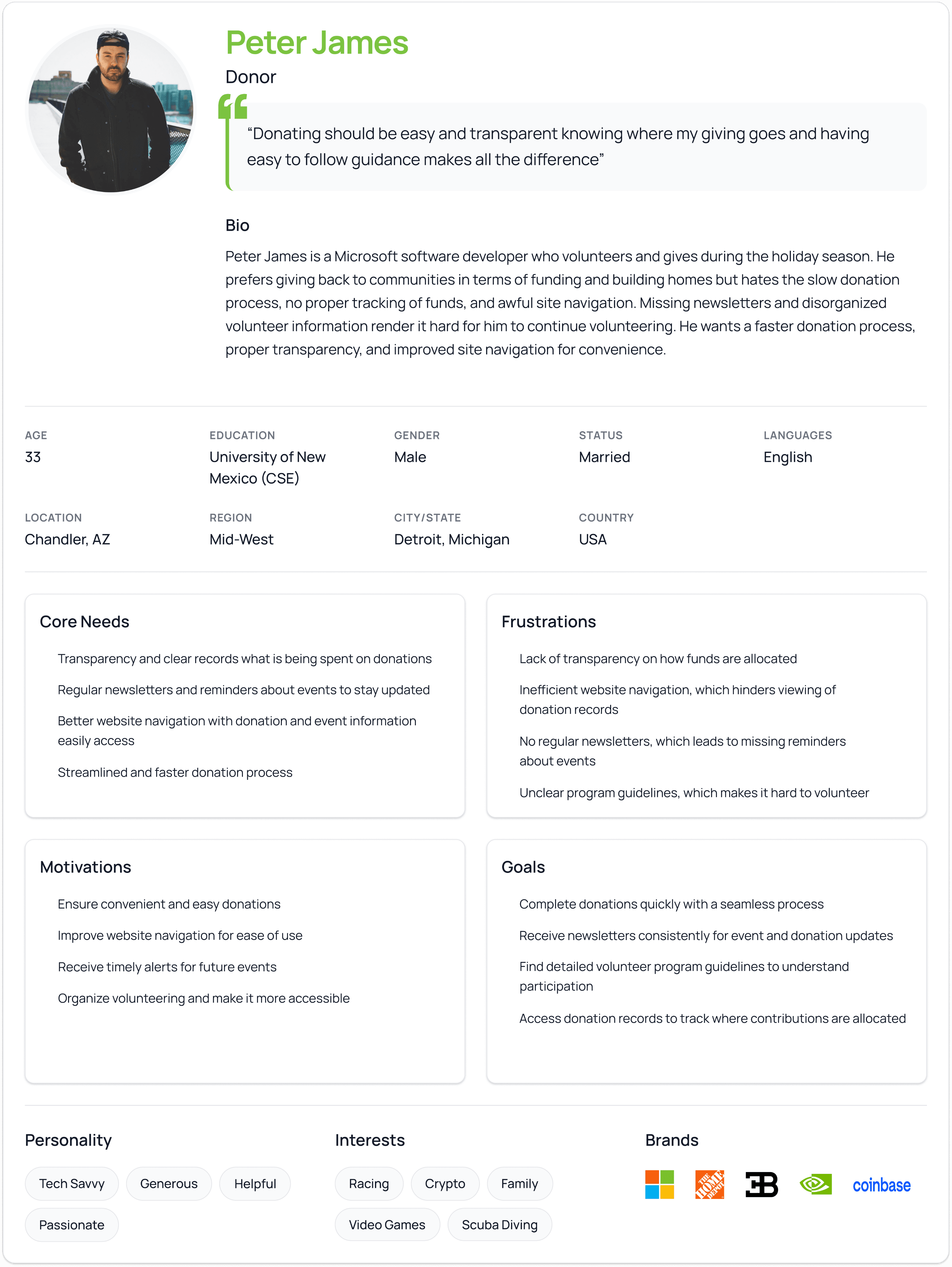
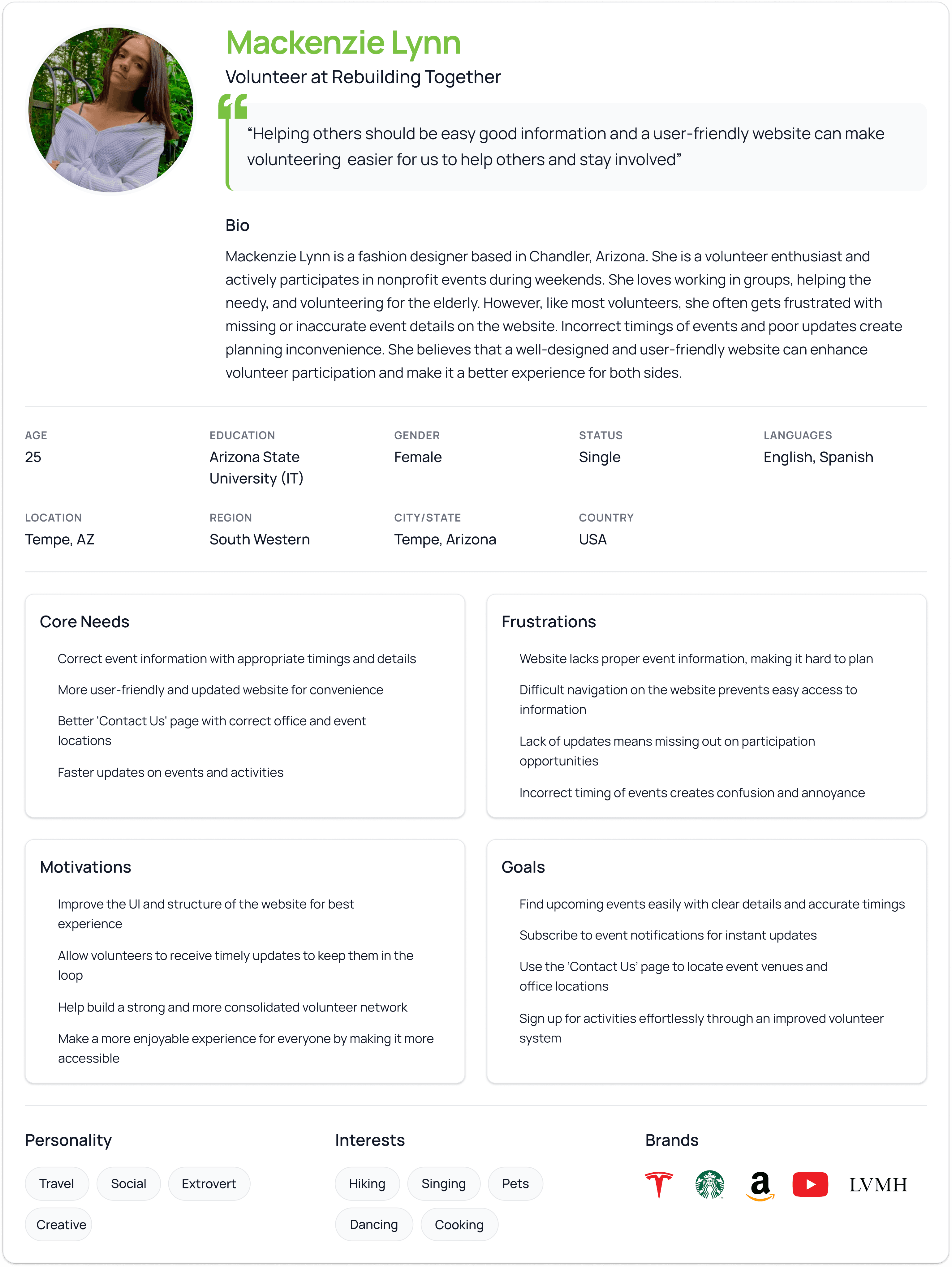
The heuristic evaluation revealed major usability issues across feedback visibility, consistency, error prevention, and help documentation, resulting in user confusion, reduced trust during critical actions such as donations, and an overall outdated and difficult-to-navigate experience.
Heuristic Evaluation
Visibility of System Status
Users receive no immediate confirmation or feedback after completing donations, leaving them unsure whether the action was successful.
3 – Major
Impact:
Reduces trust and confidence during critical donation flows.
Match Between the System and the Real World
Program names and sections (e.g., "Kickoff to Rebuild") are not clearly explained for first-time users.
2 – Minor
Impact:
Causes confusion and increases cognitive load for new visitors.
User Control and Freedom
No usability issues identified.
0 – No Issue
Impact:
No negative impact on user experience.
Consistency and Standards
Different donation and volunteer options lead to similar generic forms without distinction or contextual clarity.
3 – Major
Impact:
Creates mismatched expectations and weakens user
understanding of choices.
Error Prevention
Forms do not clearly indicate required fields, allowing incomplete or incorrect submissions.
3 – Major
Impact:
Leads to form errors, frustration, and failed task completion.
Recognition Rather Than Recall
Navigation does not clearly highlight the active page or selected menu state.
2 – Minor
Impact:
Makes orientation difficult and increases navigation effort.
Flexibility and Efficiency of Use
No usability issues identified.
0 – No Issue
Impact:
Does not hinder experienced or returning users.
Aesthetic and Minimalist Design
Outdated visual design, poor spacing, strong background colors, and weak typography hierarchy reduce readability.
4 – Usability Catastrophe
Impact:
Severely impacts usability, scannability, and overall credibility.
Help Users Recognize, Diagnose, and Recover from Errors
No usability issues identified.
0 – No Issue
Impact:
Errors are understandable when they occur.
Help and Documentation
No FAQ, help content, or support tools (chat, guidance) are available for donations or volunteering.
4 – Usability Catastrophe
Impact:
Leaves users unsupported, especially first-time donors and volunteers.
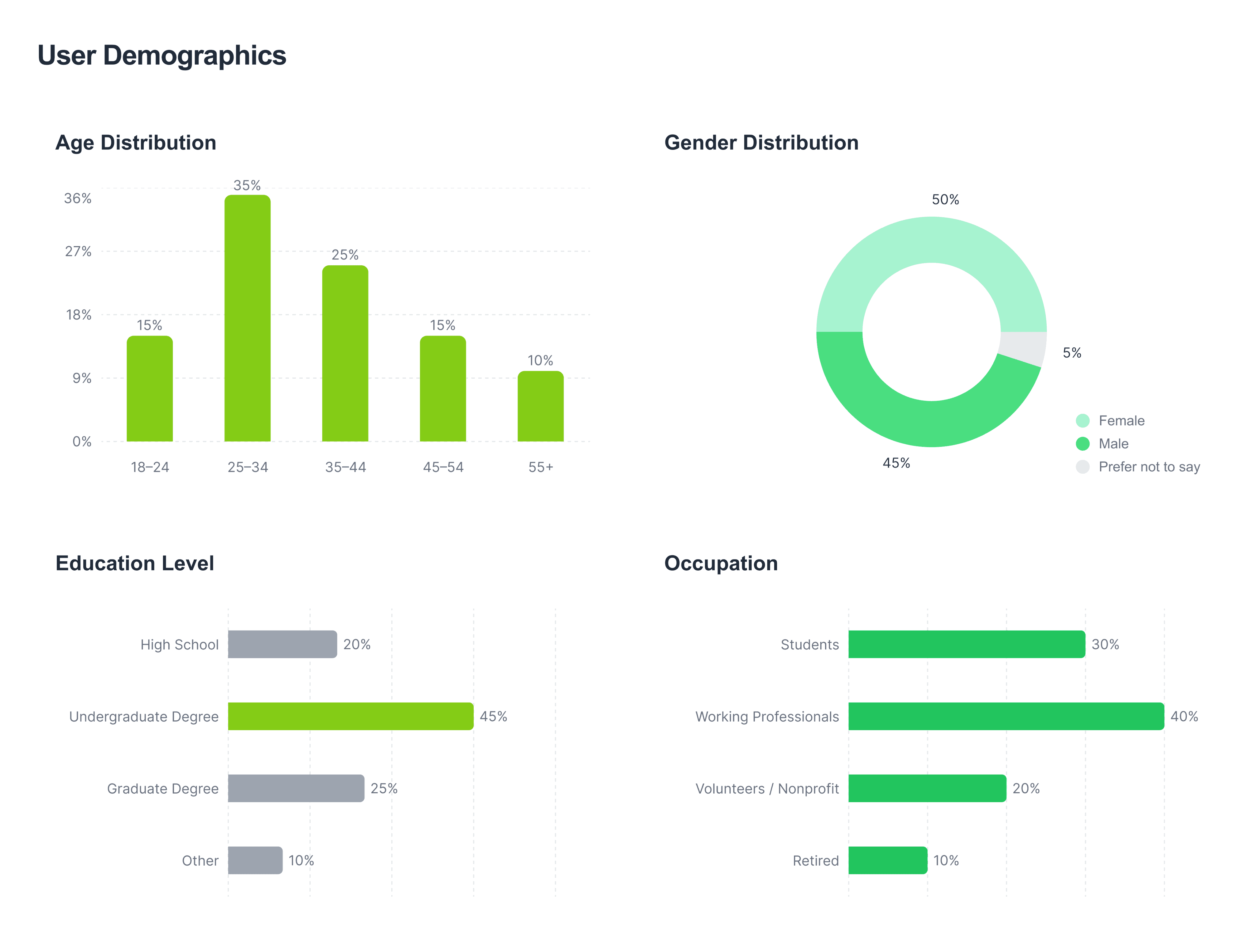
The purpose of this user research was to understand how users perceive, navigate, and interact with the RTVOS website, with a focus on identifying usability barriers in volunteering, donations, and information discovery. The findings helped uncover key pain points, user expectations, and behavioral patterns that informed evidence-based design decisions for improving usability, engagement, and trust.
User Research
Pain Points
Objectives
Lack of Interactive & Hands-On Engagement
Improve Website Interactivity and Engagement
Limited Functionality and Cumbersome Experience
Simplify Navigation and Information Architecture
Difficulty Finding Relevant Information
Streamline Volunteer and Donation Flows
Outdated Visual Design and Layout
Modernize Visual Design and Layout
Complex Volunteer Sign-Up Process
Increase Awareness Through Better Digital Presence
Low Awareness and Discoverability of RTVOS
Support First-Time and Returning Users Equally
Work Overview
Timeline
January - May 2025
Responsibilities
User Research & Heuristic Evaluation
Accessibility Audit
Usability Testing
Low- to High-Fidelity Redesign
Prototyping
Disciplines
Human Computer Interaction
Tools
Google Docs,Forms,Sheets
Figma
Chat GPT
A11y
TEAM
Preetham Kalle
Problem Statement
Rebuilding Together Valley of the Sun (RTVOS) is a non-profit organization that depends on its website to drive donations, volunteer participation, and fundraising support for its mission. However, the current platform suffers from fragmented navigation, an unclear information hierarchy, and a lack of system feedback, which makes critical flows confusing and reduces user confidence during high-impact actions. I focused on solving these issues to ensure users can easily understand, trust, and complete their actions, directly supporting RTVOS’s ability to engage the community and sustain its mission.
Rebuilding Together Valley of the Sun
Redesigning and Improving a Non-profit Website : RTVOS Website Link