This project improved the YouTube Shorts experience in the YouTube VR panel on Meta Quest 3 by addressing key usability issues related to feedback visibility, control placement, and cognitive load, and by applying human systems engineering principles. The redesigned interactions restore familiar YouTube behaviors, making actions more predictable and reducing user confusion. As a result, users can complete tasks more efficiently, understand system responses more clearly, and feel greater confidence while navigating Shorts within a panel-based VR environment.
Design Impact & Final Outcomes
Reduced user confusion by aligning VR interactions with familiar YouTube behaviors
Improved task efficiency through clearer control placement
Lowered cognitive load by reducing memory-based interactions
Increased user confidence with immediate visual feedback
Delivered a more predictable and learnable Shorts experience in VR
Impact Results
Design System
32/36 | -0.2%
32/36 | -0.2%
24/28 | -0.1%
20/24
20/24
14/20
14/20
11/16
24/28 | -0.1%
11/16
Bold
Light
Bold
Bold
Light
Bold
Regular
Bold
Regular
Light
Headline 1 - Strong
Headline 1
Headline 2 - Strong
Headline 2
Headline 3 - Strong
Headline 3
Body 1 - Strong
Body 1
Body 2 - Strong
Body 2
Typography - Inter
Black
100
Jet Black
100
Dark Black
100
Gray
100
White
100
Red
100
Colors
Shaping & Shapes
24
16
12
8
Panels, Large Elements
Cards, Notifications, Containers
Small containers
Small Elements
12
8
16
20
24
28
32
36
40
44
48
Prototype
Design Innovations
1. Visible Progress Bar for Shorts Playback
Users were lacked clear feedback on video duration while watching Shorts in VR, which led to uncertainty and frustration. To address this, a visible progress bar was added at the bottom of each Short, providing real-time playback status. This simple cue helped users understand how much content remained, reduced cognitive effort, and increased their sense of control while viewing videos in panel mode.
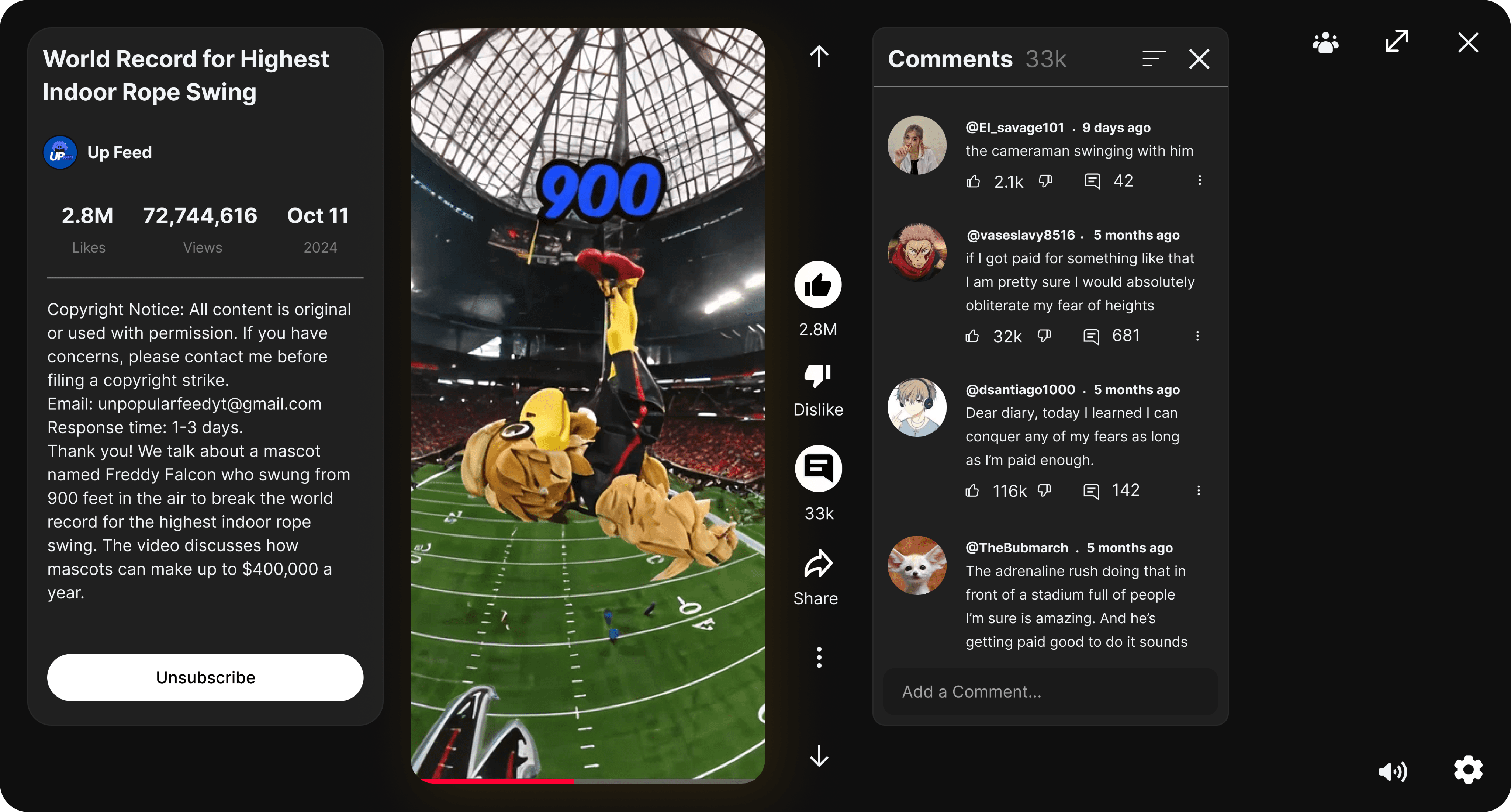
Added Progress Bar for the video
2. Dedicated Pause and Resume Controls
Users instinctively attempted to pause videos by interacting directly with the content, reflecting familiar YouTube behavior from mobile and desktop. Since this interaction was not supported in VR, it caused confusion and repeated trial-and-error. Introducing clear pause and resume controls within the video panel aligned the experience with user expectations, reduced friction, and made playback control more intuitive in VR.
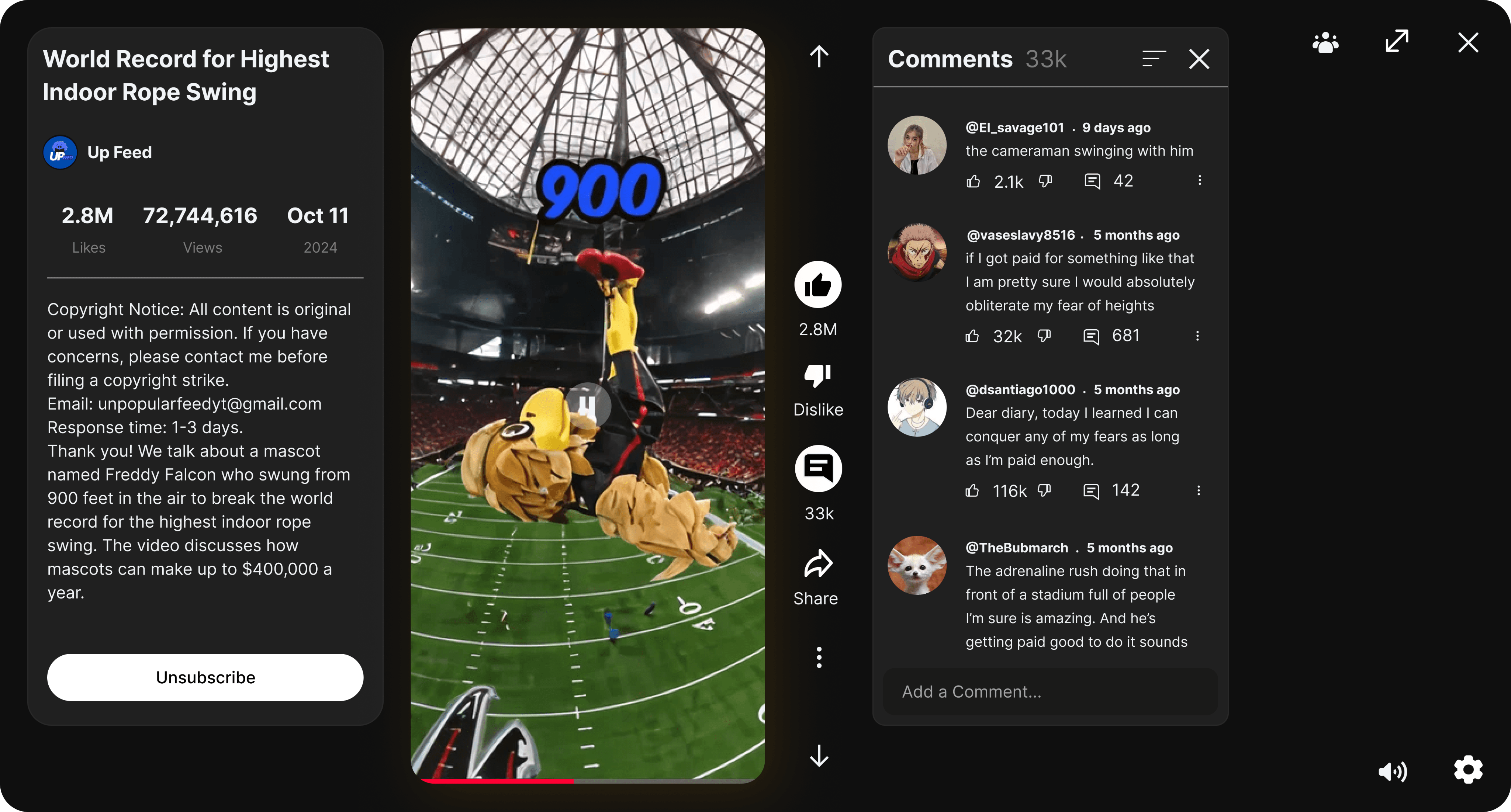
Added Pause & Resume controls for the video
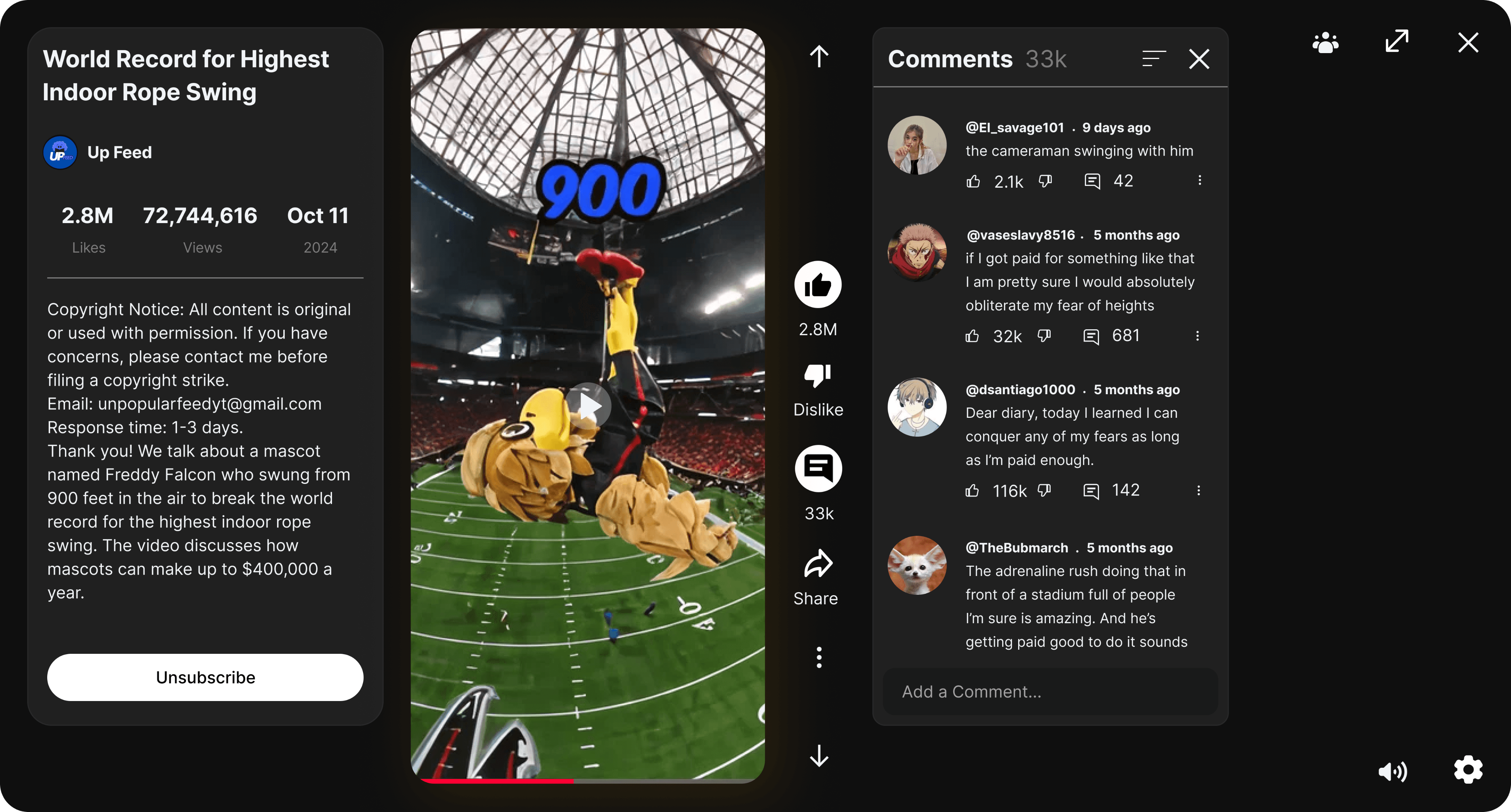
Added Pause & Resume controls for the video
3. Improved Placement of Volume Controls
Users struggled to locate the volume control because it was placed far from related playback controls, increasing search time and disrupting the viewing experience. Moving the volume control closer to other playback and settings controls grouped related actions, improving discoverability and enabling faster adjustments without breaking user focus.
Moved volume button to the bottom right side
4. Repositioned Comments Panel to Reduce Overlap
Opening the comments section panel previously covered important information, such as the video description and Subscribe button, forcing users to rely on memory or repeatedly toggle panels. Repositioning the comments panel to unused space on the right prevents content overlap and allows users to read comments, access video details, and take actions without losing context.
Moved comments panel to the right side
5. Clear Visual Feedback for Actions
Users could perform actions such as liking or replying to the short video, but the system provided little confirmation that the actions were successful. Adding clear visual feedback reassures users that their input has been registered, reduces repeated actions, and closes the interaction loop with greater confidence.
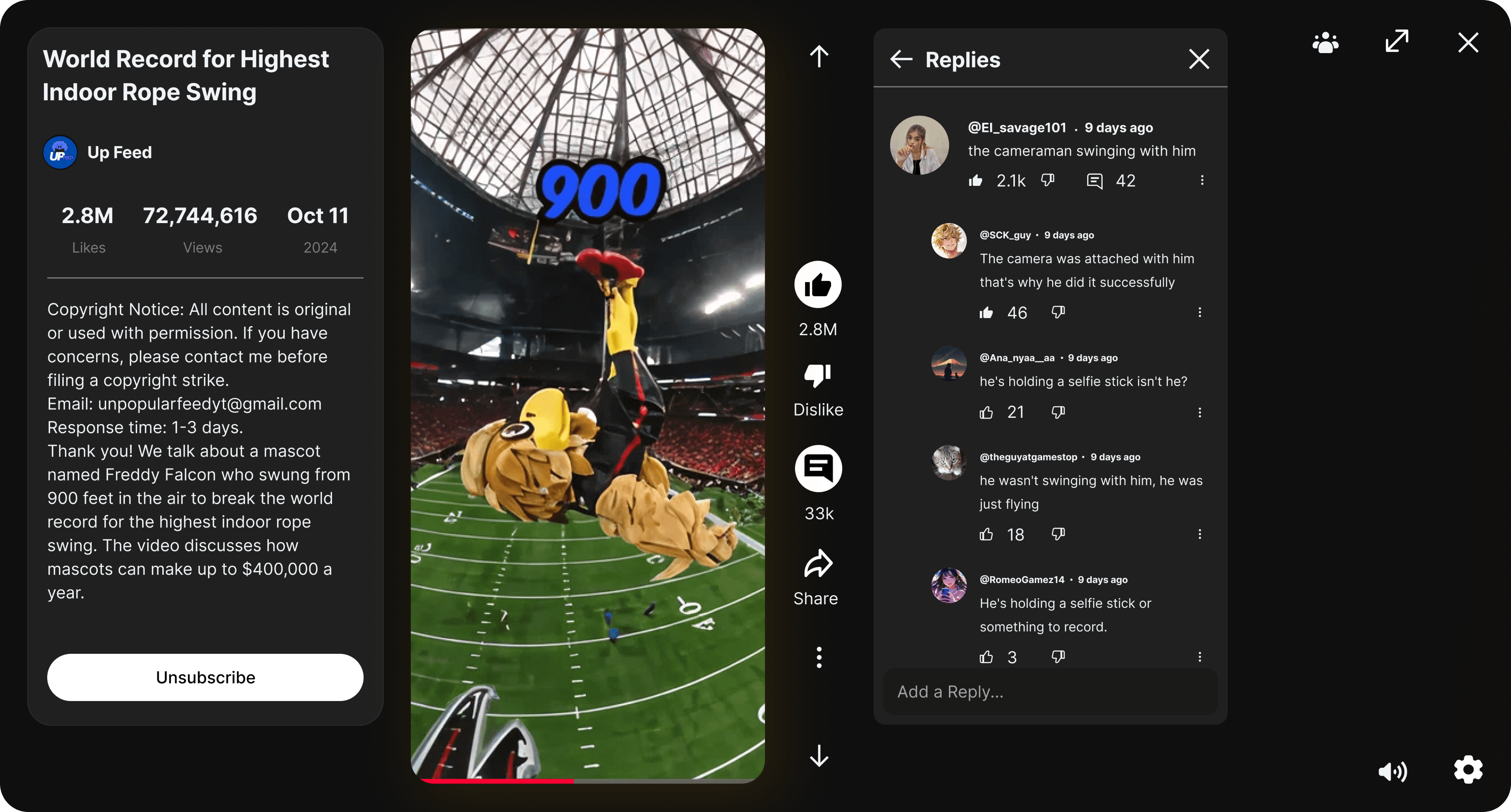
Added Visual Feedback to the reply section
Applying Human Systems Engineering (HSE) Principles
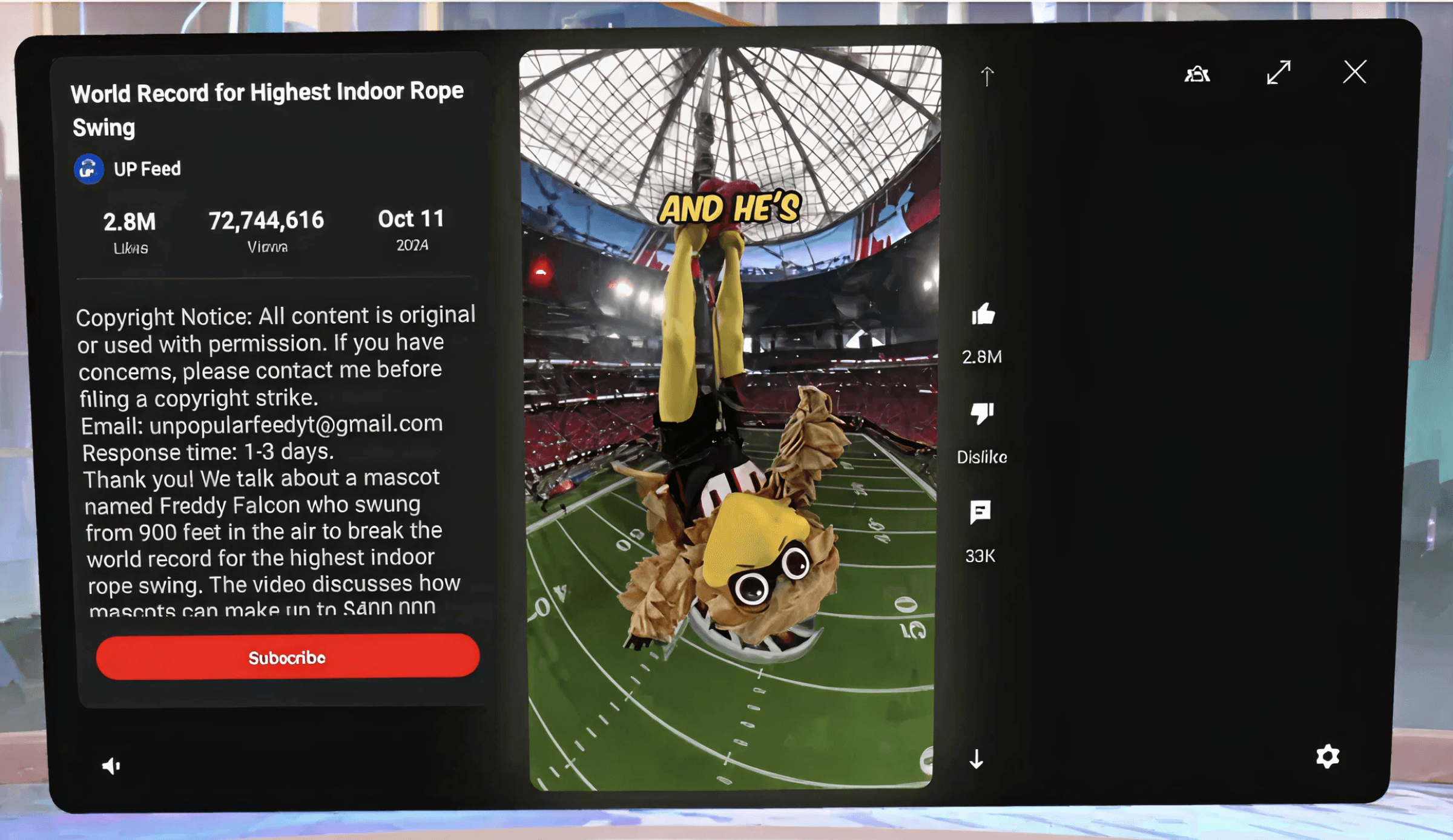
(Feedback): No progress bar at the bottom of the YouTube shorts.
1. Feedback
Users lacked clear playback and action feedback, making it challenging to understand video state and system response, which reduced confidence and increased interaction uncertainty.
No Playback Awareness
No visible playback progress or duration indicator was present.
Unclear System State
Users could not tell whether the video was playing, paused, or responding.
No Action Confirmation
Pause interactions provided no immediate visual confirmation.
Feedback from Observations
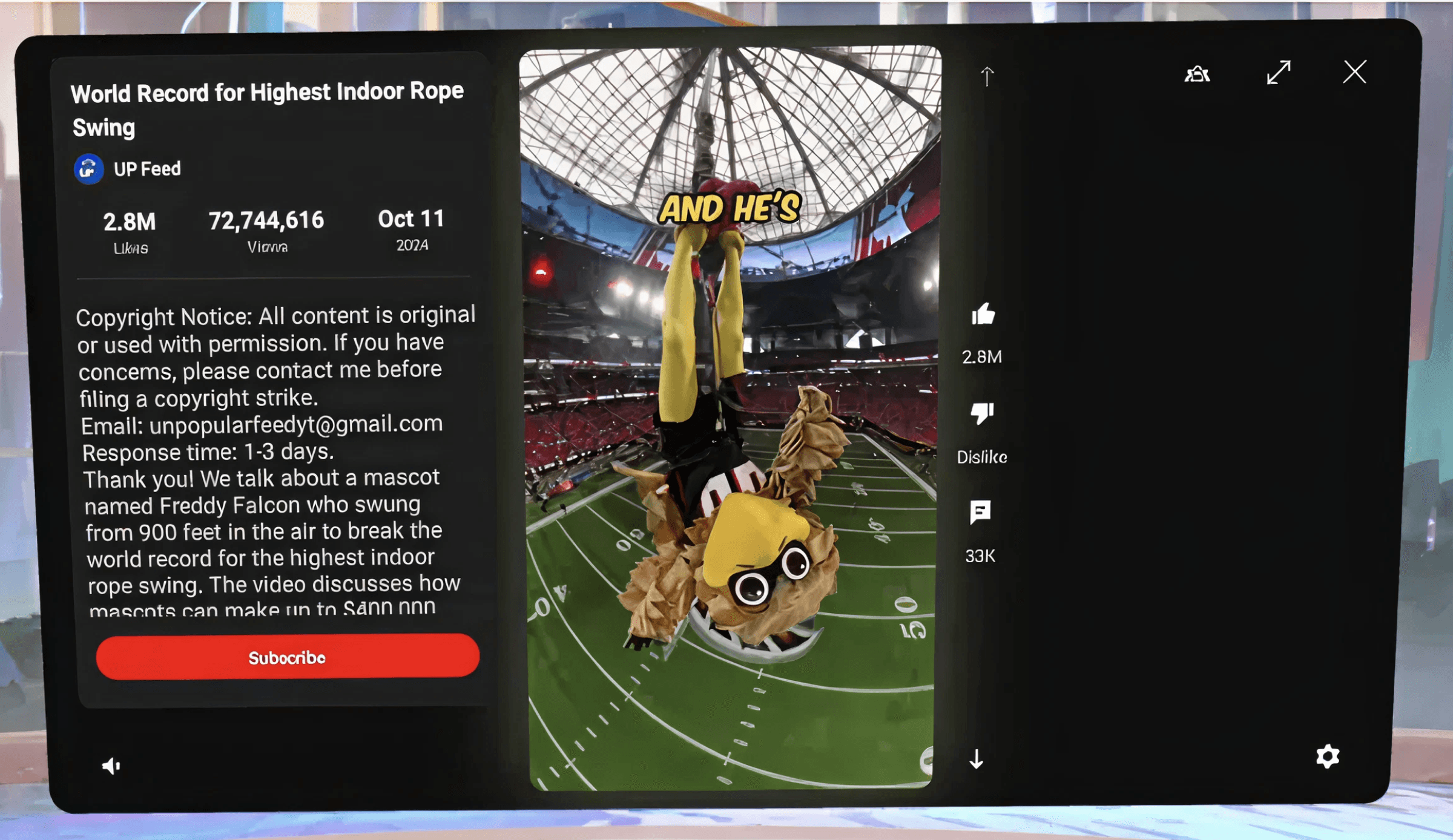
(Proximity Compatibility): Volume and settings buttons are at opposite ends.
2. Proximity Compatibility
Controls supporting the same task were placed far apart, increasing visual search, effort, and task completion time.
Separated Playback Controls
Playback and volume controls were positioned far apart within the panel.
Increased Visual Search
Users spent extra time scanning the interface to locate the volume control.
Slower Task Completion
Spatial separation increased effort and delayed task execution.
Feedback from Observations
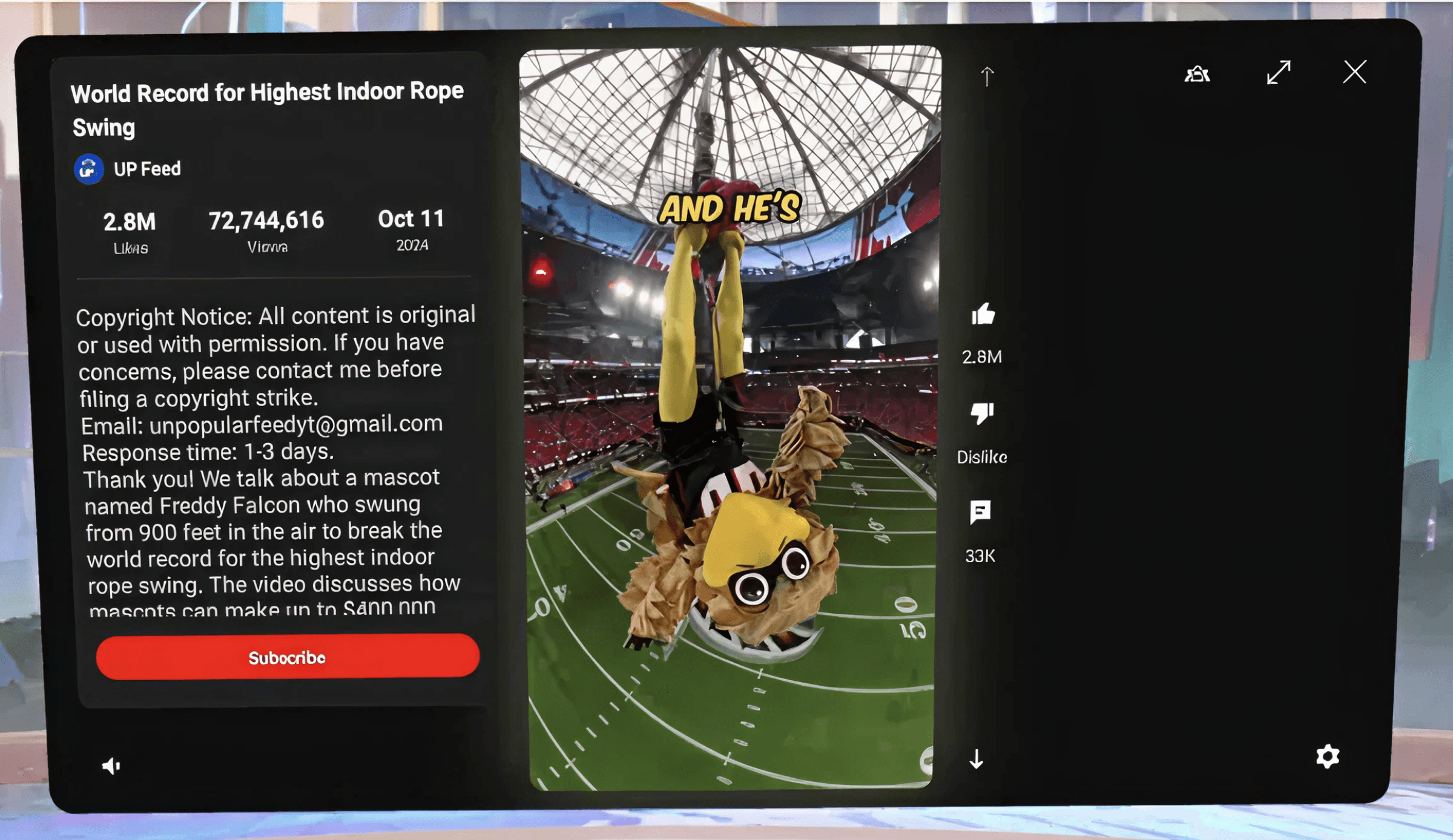
(Expectancies): No option available to pause a video.
3. Expectancies
Users expected familiar YouTube interactions, and when these were not supported in VR, confusion and hesitation increased.
Direct Video Interaction Expected
Users attempted to pause or resume playback by clicking directly on the video.
Reliance on Familiar Mental Models
Users applied interaction patterns from mobile and desktop YouTube experiences.
Confusion and Hesitation
When expectations were not met, users hesitated and retried actions.
Feedback from Observations
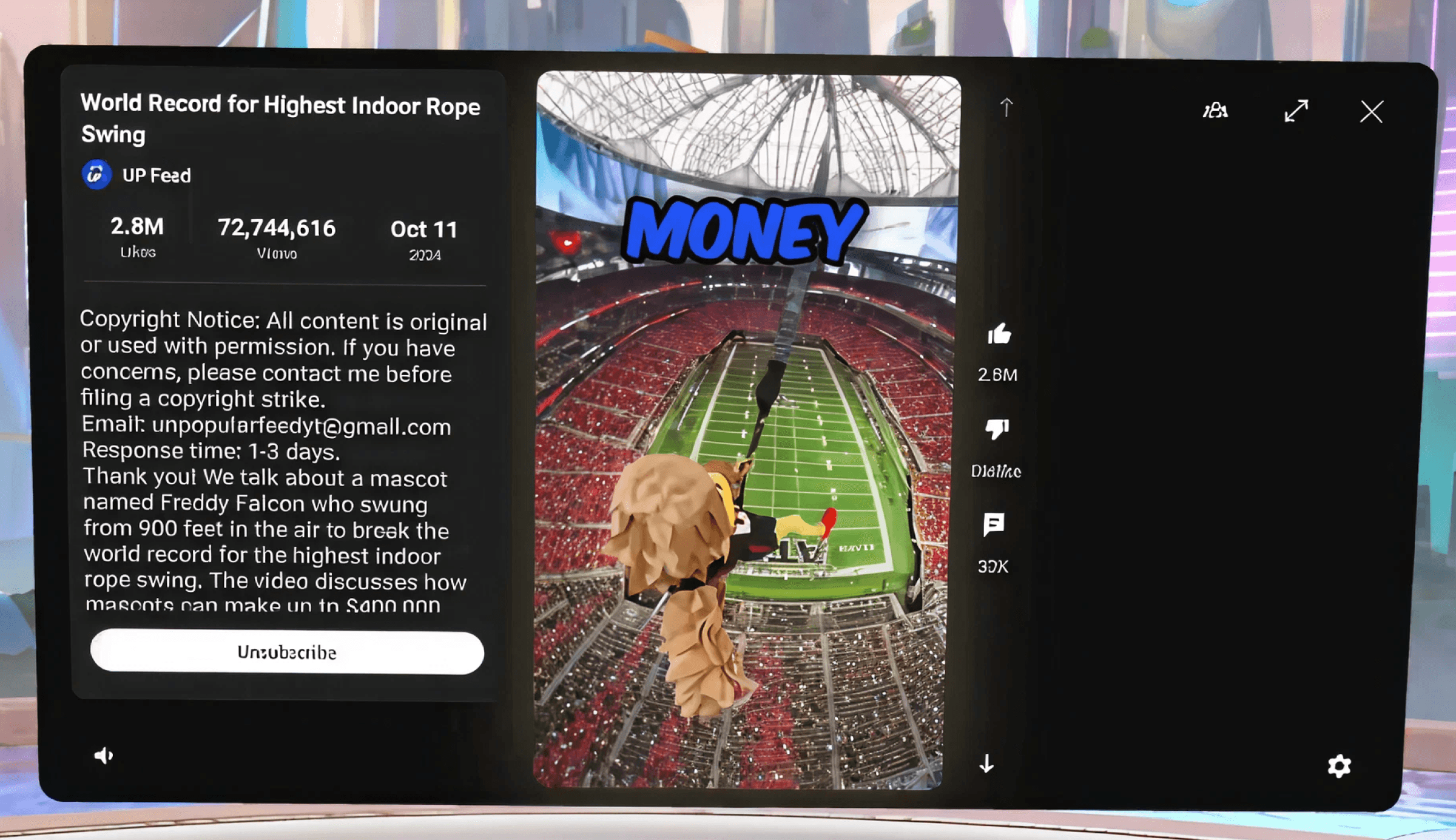
(Gulf of Evaluation): Lack of feed back when the Like button is clicked.
4. Gulf of Evaluation
Users could not clearly tell whether their actions were successfully completed, increasing uncertainty and reducing confidence.
No Action Confirmation
Users were unsure whether actions like liking a video were registered.
Lack of System Feedback
The interface did not provide visible confirmation after user actions.
Assumption-Based Interaction
Users relied on guesswork instead of clear system responses.
Feedback from Observations
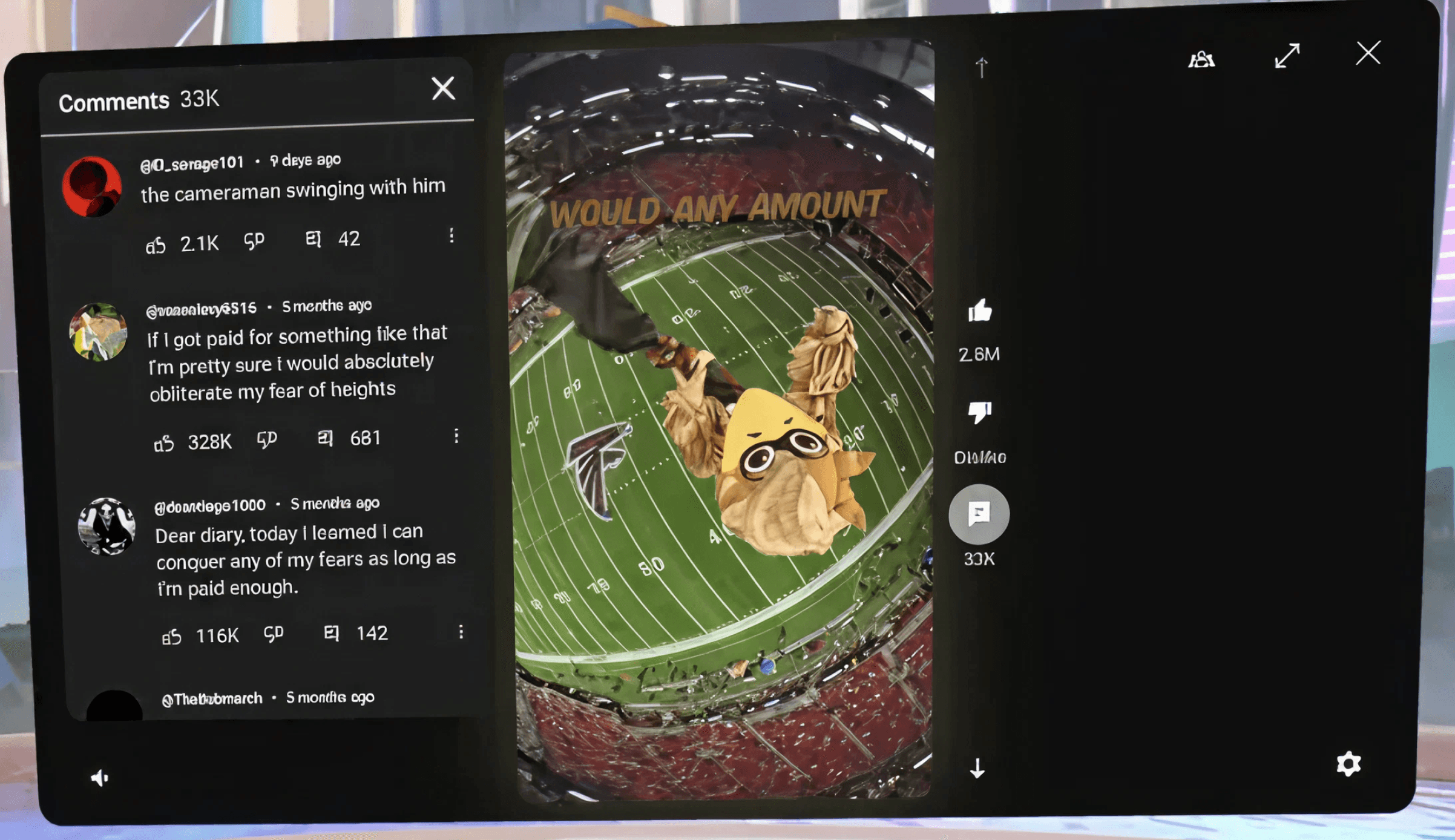
(Working Memory): Comments panel covers up Description panel (and Subscribe button)
5. Working Memory
Users were required to remember the location of controls that were no longer visible, increasing mental effort.
Hidden Controls
Key actions like Subscribe became obscured when panels changed.
Memory Over Recognition
Users had to recall control locations instead of seeing them.
Interrupted Task Flow
Switching panels increased cognitive load and slowed interaction.
Feedback from Observations
The testing was conducted using the YouTube VR application on Meta Quest 3 in panel mode. Three participants with different backgrounds have completed a set of predefined tasks which we have made the tasks where it includes playing a video, pausing, liking, commenting, subscribing, and adjusting volume. Task performance and interaction difficulties were observed to identify usability breakdowns in the Shorts panel interface.
Observations
Task Completion Time (in seconds)
200
150
100
50
0
195 sec.
90 sec.
110 sec.
Participant 3
Participant 2
Participant 1
Participants
Task Completion Time (sec)
A. Task Completion Time
The bar graph shows that task completion time varied significantly across participants. Users who faced difficulty locating controls and understanding available interactions took longer to complete tasks. This indicates that the current panel-based interface lacks clear affordances for efficient interaction.
Average Success and Failure Rate Among Assigned Tasks
100
80
60
40
20
0
71%
29%
Success
Failure
Outcome
Percentage (%)
B. Task Success and Failure Rate
The bar graph highlights that while most tasks were eventually failure, a notable portion is completed. These failures primarily occurred during actions such as pausing videos and adding comments. The results suggest a mismatch between user expectations and system feedback within the YouTube Shorts panel.
As a team, we have identified that the YouTube Shorts panel in YouTube VR on Meta Quest 3 lacks clear interaction feedback, intuitive control placement, and spatial consistency. These gaps have made basic actions such as pausing playback, adjusting volume, and confirming user inputs feel uncertain and error-prone, increasing cognitive load and reducing user confidence while interacting with Shorts in a panel-based VR environment.
Problem in YouTube shorts in panel
Why We Are Solving This
Panel-based VR experiences rely heavily on clear feedback, predictable interactions, and low cognitive effort. When basic actions feel uncertain or require trial and error, users lose confidence and control within the experience.
Why It Matters
Reduces cognitive load during interaction
Restores user confidence and control
Keeps short-form content fast and intuitive
Improves usability in panel-based VR systems
During testing phase of the YouTube Shorts panel interface on Meta Quest 3, users consistently attempted interactions based on familiar mental models from mobile and desktop devices. However, the panel-based VR system failed to clearly support these expectations.
Key Usability Breakdowns Observed
Pause Interaction Fails
Users attempted to pause videos by interacting directly with the Shorts panel, but playback continued without any response.
Volume Control Is Hard to Find
The volume control was difficult to locate due to its separation from related media controls.
No Confirmation for Actions
Users could not determine whether actions such as ‘Like’ had been successfully completed.
Comments Panel Blocks Interaction
Opening the comments panel obscured important content and prevented users from commenting or replying.
we are solving this problem because panel-based VR experiences rely heavily on clarity, feedback, and predictable interaction patterns. The actions fail within a panel interface, users lose confidence and must rely on trial and error. Improving these interactions makes YouTube Shorts remains fast, intuitive, and low-effort even when viewed inside a VR panel.
Video -1
Video -2
Video -3
Here are the 3 videos showing what exactly the problem faced by the users
Work Overview
Timeline
March - May 2025
Responsibilities
UX Research
UI Design
Disciplines
Human Computer Interaction
Human Systems Engineering
Tools
Figma
Meta Quest 3
Team
Preetham Kalle
Scott Nokes
The project evaluates and redesigns the YouTube Shorts experience in YouTube VR on Meta Quest 3, where short-form videos are displayed as 2D panels in a 3D VR space. As a team, we identified usability issues in core interactions, including playback controls, volume adjustment, and action confirmation. Applying Human Systems Engineering (HSE) principles, we explored design improvements to reduce cognitive load and improve interaction clarity in panel-based VR.
Project Background
Redesigning the YouTube Shorts in Panel VR
Improving control, feedback, and cognitive clarity on Meta Quest 3